
Associate
November 19, 2025
Question

Build a STM32CubeIDE project via command line

  • November 19, 2025
  • 1 reply
  • 232 views

I have a STM32 project created for STM32H757 which has dual core CPU. The directory structure is look like this:
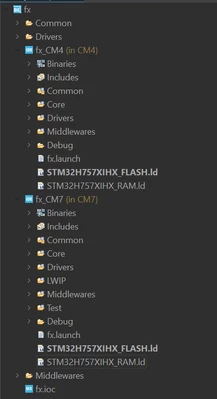
virendra_dalal_0-1763558849799.png

I wanted to build this project using command line in my ubutnu machine. I have tried with this command:

$ <INSTALLTION_DIRECTORY>/st/stm32cubeide_1.12.1/stm32cubeide --launcher.suppressErrors -nosplash -application org.eclipse.cdt.managedbuilder.core.headlessbuild -data "./" -build fx/CM7

But it shows "WARNING: No Project matched "fx/CM7". Skipping..."

I have tried running it from root of the project directory like "<REPO_PATH>/sca_repo/fx_redesign/fx", also tried it running from inside the fx directory too like "<REPO_PATH>/sca_repo/fx_redesign/fx/CM7/". But output does not changed, I can not figure out what I am missing here, can anyone help me ?


1 reply

Technical Moderator
November 21, 2025

Hello @virendra_dalal 

It seems that the issue is related to the name of project: try -build fx_CM7 instead of -build fx/CM7 

BR, Souhaib


To give better visibility on the answered topics, please click on Accept as Solution on the reply which solved your issue or answered your question.
Associate
November 24, 2025

Hi Souhaib,

I have tried with all the different combinations like fx_CM7, fx, fx/CM7. But output is same:

WARNING: No Project matched "fx_CM7". Skipping...

The fx is project name, which is given in .project file:

<?xml version="1.0" encoding="UTF-8"?>
<projectDescription>
 <name>fx</name>
 <comment></comment>
 <projects>
 </projects>
 <buildSpec>
 </buildSpec>
 <natures>
 <nature>com.st.stm32cube.ide.mcu.MCUProjectNature</nature>
 <nature>com.st.stm32cube.ide.mcu.MCUCubeProjectNature</nature>
 <nature>com.st.stm32cube.ide.mcu.MCURootProjectNature</nature>
 <nature>com.st.stm32cube.ide.mcu.MCUCubeIdeServicesRevAev2ProjectNature</nature>
 <nature>com.st.stm32cube.ide.mcu.MCUMultiCpuProjectNature</nature>
 </natures>
</projectDescription>

I am running this command from the root directory. My actual path for the project is:

/home/virendra/sca_repo/fx-redesign/fx

Here are the contents of this path:

virendra_dalal_4-1763970710258.png


After couple of retries, I have changed a command a bit to this:

$ /home/st/stm32cubeide_1.12.1/stm32cubeide --launcher.suppressErrors -nosplash -application org.eclipse.cdt.managedbuilder.core.headlessbuild -data "/home/virendra/sca_repo/fx-redesign/" -build fx


And, response was this:

Project: fx doesn't appear to be a CDT project. Skipping...
WARNING: No Config matched "fx". Skipping...


Technical Moderator
December 5, 2025

Hello @virendra_dalal 

fx doesn't appear to be a CDT project. means that CubeIDE does not recognize it as an Eclipse/CDT project,
Could you please check if any of your project files are missing (i can't see .cproject in your path) or try to re-import your project in stm32CubeIDE;

To give better visibility on the answered topics, please click on Accept as Solution on the reply which solved your issue or answered your question.