Can’t enable LSE clock source in CubeIDE (STM32G431K6T6, CubeIDE 1.19.0)
Hi everyone,
I’m using STM32CubeIDE 1.19.0 with an STM32G431K6T6, and I’m having two issues in the CubeMX configuration that I can’t seem to solve:
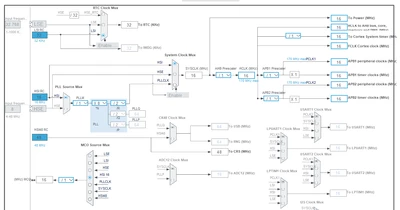
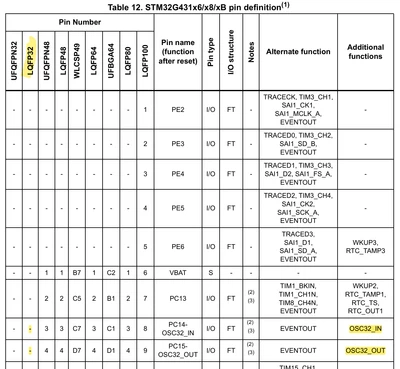
LSE clock configuration not available
In the RCC tab, I can only configure the HSE clock (High Speed Crystal/Ceramic Resonator, LSCO, etc.).
There’s no option to enable or select the LSE (Low Speed External) oscillator.
The tool shows this message:
“LSE OSC is not available. To enable it, go back to IP RCC in Pinout Tab.” But when I open the RCC configuration, there’s still no LSE or LSI section available.ADC12 clock selection is greyed out
When I enable ADC1 (ADC12) in the Pinout view, the ADC clock source field is greyed out and cannot be changed.
CubeIDE shows this message:
“ADC12 Clock Selection is not available. To enable it, one of the following RCC modes or IPs have to be configured from the Pinout Tab: - ADC12 enabled.” But ADC1 is already enabled, and I still can’t select the ADC clock.
I’ve already tried:
Enabling/disabling ADC1 and reconfiguring RCC
Switching clock sources (HSI/HSE/PLL)
Resetting the .ioc file and starting from scratch
Installing the latest STM32CubeG4 firmware package
The problem still persists.
Has anyone experienced this issue on STM32G431 or other STM32G4 devices?
Is this a known CubeMX bug or a hardware limitation specific to this MCU?
Here is piece of .ioc configuration: