
Associate III
July 14, 2025
Solved

Cannot create a STM32 project - in targeted project selector STM32 project is not available

  • July 14, 2025
  • 3 replies
  • 4272 views

Hello,

I am currently working with STM32 Cube IDE

Version: 1.18.1

Build: 24813_20250409_2138 (UTC)


When I try to create a new project I select the processor and click next. Then the setup dialog appears (as usual).

But in the targeted device selection the STM32Cube IDE project is not selectable:
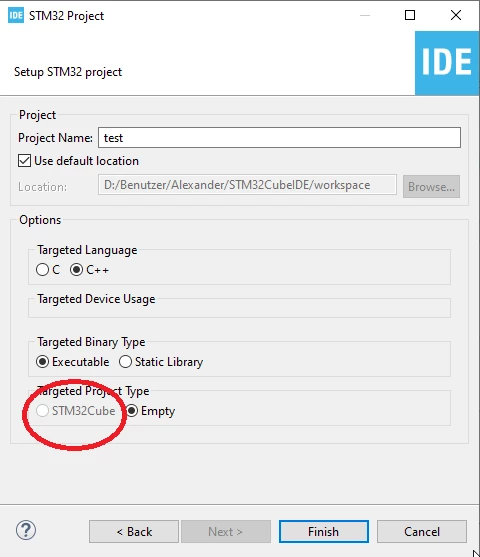
 

2025_07_14_15_20_54_STM32_Project.png


Consequently I get no .ioc file after creating the project.


Things I already tried:

1. Restart IDE

2. Update

  • Help > Manage Embedded Software Packages

  • Under STM32Cube MCU Packages, install the firmware for your MCU series (e.g., STM32F4).

3. restart IDE with -clean option

In a bash I used

STM32CubeIDE -clean


Nothing helped. What can I do?


regards


Alexander


Best answer by Ghofrane GSOURI

Hello @DocAlex 

I recommend you to use the latest version of STM32CubeIDE 1.19.0 ,it works correctly .

if you want to keep using 1.18.1 ,please try to:

-Close STM32CubeIDE

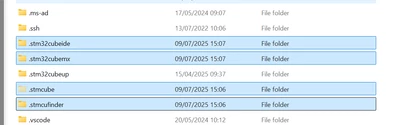
-Delete all those files from your PC: .stm32cufinder, .stm32cubemx, .stm32cubeide and .stm32cube 

GhofraneGSOURI_0-1752500523515.png


then restart the STM32CubeIDE and retest again.

THX

Ghofrane

3 replies

Ghofrane GSOURI
Ghofrane GSOURIBest answer
Technical Moderator
July 14, 2025

Hello @DocAlex 

I recommend you to use the latest version of STM32CubeIDE 1.19.0 ,it works correctly .

if you want to keep using 1.18.1 ,please try to:

-Close STM32CubeIDE

-Delete all those files from your PC: .stm32cufinder, .stm32cubemx, .stm32cubeide and .stm32cube 

GhofraneGSOURI_0-1752500523515.png


then restart the STM32CubeIDE and retest again.

THX

Ghofrane

To give better visibility on the answered topics, please click on Accept as Solution on the reply which solved your issue or answered your question.
Visitor II
July 18, 2025

Where can i find those folders


Ghofrane GSOURI
Technical Moderator
July 18, 2025

Hello @mhdafnan 

Those folders located under C:\Users\XXXX (where XXXX is your username).

THX

Ghofrane

To give better visibility on the answered topics, please click on Accept as Solution on the reply which solved your issue or answered your question.
DocAlexAuthor
Associate III
July 14, 2025

Wow, what a response time!

Tried.

I installed the update.

It fixed the problem. Thank you!


Alexander

DocAlexAuthor
Associate III
July 21, 2025

After installing the version 1.19 everything was fine. Now I am stuck at exactly the same point: I cannot select an STM32 project.


This is really annoying.

Any ideas?


Regards

Alexander

Ghofrane GSOURI
Technical Moderator
July 21, 2025

Hello @DocAlex 

Please check this post , it is very useful .

THX

Ghofrane

To give better visibility on the answered topics, please click on Accept as Solution on the reply which solved your issue or answered your question.
Visitor II
July 21, 2025

Thanks for the link. I will try this as I had exact same problem with 1.18 and then 1.19 solved it but today's update broke it again.

I will follow the guide and I hope it will resolve the problem on 1.19.

Cheers.