Associate II
April 28, 2025
Solved

Cant find SPI3_ICS

  • April 28, 2025
  • 6 replies
  • 888 views

Hi 

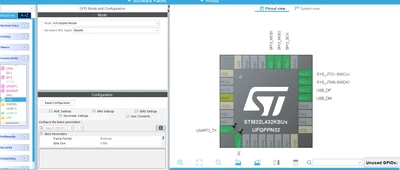
Im a bit new. I'm following a tutorial and i cant find the SPI_ICS like the guy on the video on the picture did.

Its a STM32L432KBU

Tutorial pic:
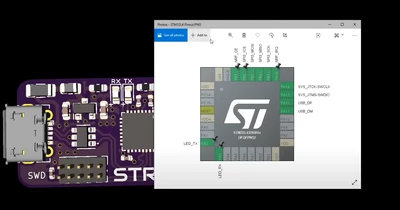
siyar_0-1745832732403.png


My STM32:

siyar_1-1745832804734.png


Best answer by Mahmoud Ben Romdhane

Hello @siyar ,


I suggest that you take a look at UM1718 section 4.5.12 GPIO configuration window.

Under User Label, you can change the default name (such as GPIO_input) into a user defined name.

The Pinout view is updated accordingly. 
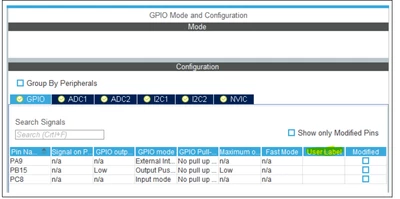
 

MahmoudBenRomdhane_0-1746180948249.png


Thanks.

Mahmoud

6 replies

Pavel A.
Super User
April 28, 2025

which video? Have you tried to ask that guy? He would be glad to know that someone enjoys his video.


siyarAuthor
Associate II
April 28, 2025
Pavel A.
Super User
April 28, 2025

Great, so here is the link to the author who should be very happy to hear from you. (otherwise people won't invest effort in making these videos, right?)

https://www.phils-lab.net/


siyarAuthor
Associate II
April 28, 2025

Also couldnt find NRF_CE and NRF_IRQ

Pavel A.
Super User
April 28, 2025

The author of the video may be even more happy to explain you about that.

"NRF" sounds like Nordic bluetooth or wi-fi.


Ozone
Principal
April 28, 2025

As stated, a link to the video would be helpful.

The terminology surrounding SPI is not always fully consistent. I would recommend to review the video, and the datasheet of the intended slave device. Especially when supporting more than one bus type / bus mode, the pin names can get confusing.

Check both, but even better would be a schematic of the circuitry the video talks about.

Technical Moderator
April 28, 2025

Hello @siyar ,


First let me thank you for posting and welcome to the ST Community.

I suggest that you provide please the STM32CubeMX version.


Thanks.

Mahmoud

To give better visibility on the answered topics, please click on Accept as Solution on the reply which solved your issue or answered your question.
siyarAuthor
Associate II
April 28, 2025

Hi

Thanks, im using 1.17.0

Technical Moderator
May 2, 2025

Hello @siyar ,


I suggest that you take a look at UM1718 section 4.5.12 GPIO configuration window.

Under User Label, you can change the default name (such as GPIO_input) into a user defined name.

The Pinout view is updated accordingly. 


MahmoudBenRomdhane_0-1746180948249.png


Thanks.

Mahmoud

To give better visibility on the answered topics, please click on Accept as Solution on the reply which solved your issue or answered your question.
RobK1
Associate II
April 28, 2025

Of course you cannot "find" those pins; you have to define and name them yourself. They are not part of the SPI port, but GPIO's that have been given a user label.