
Associate III
April 12, 2024
Question

Changes in ioc file not updating the code.

  • April 12, 2024
  • 3 replies
  • 7484 views

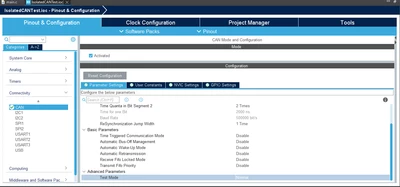
I am working on STM32F103 for a project with CAN. While working I set the CAN Test mode to Loopback in the ioc file, afterwards I set the test mode back to normal mode. but this change was not updated in the main.c file. In main.c file, the line in MX_CAN_Init(void) function still is as following.


hcan.Init.Mode = CAN_MODE_LOOPBACK;


 I cleaned the project and then again built the project, still it is same, I tried to change the test mode multiple times, but every time it asks if code should be generated and I select yes, still the code is not changing. Why is this happening?


CAN configuration:
Gladson_0-1712912318500.png

Generated code


static void MX_CAN_Init(void)
{

 /* USER CODE BEGIN CAN_Init 0 */

 /* USER CODE END CAN_Init 0 */

 /* USER CODE BEGIN CAN_Init 1 */

 /* USER CODE END CAN_Init 1 */
 hcan.Instance = CAN1;
 hcan.Init.Prescaler = 16;
 hcan.Init.Mode = CAN_MODE_LOOPBACK;
 hcan.Init.SyncJumpWidth = CAN_SJW_1TQ;
 hcan.Init.TimeSeg1 = CAN_BS1_2TQ;
 hcan.Init.TimeSeg2 = CAN_BS2_1TQ;
 hcan.Init.TimeTriggeredMode = DISABLE;
 hcan.Init.AutoBusOff = DISABLE;
 hcan.Init.AutoWakeUp = DISABLE;
 hcan.Init.AutoRetransmission = DISABLE;
 hcan.Init.ReceiveFifoLocked = DISABLE;
 hcan.Init.TransmitFifoPriority = DISABLE;
 if (HAL_CAN_Init(&hcan) != HAL_OK)
 {
 Error_Handler();
 }
 /* USER CODE BEGIN CAN_Init 2 */

 /* USER CODE END CAN_Init 2 */

}


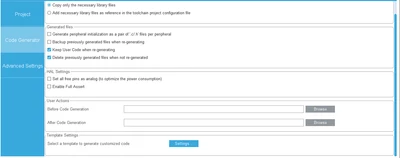
Code Generator settings
Gladson_1-1712912403244.png


3 replies

STTwo-32
Technical Moderator
April 12, 2024

Hello @Gladson 

I can't reproduce your issue. Can you share your .IOC file?

Don't forget to click on this button after changes on the .ioc file:

STTwo32_0-1712913635539.png

or click Ctrl+s to save changes.


GladsonAuthor
Associate III
April 12, 2024

I have tried clicked that "Code generation button" and also pressing ctrl + s, both did not work.

Both .IOC file and full project are in this link.

STTwo-32
Technical Moderator
April 12, 2024

I could not access the Drive link. Could you please attach your .ioc file on this post.

Best Regards.

STTwo-32

GladsonAuthor
Associate III
April 12, 2024

I have updated the access of google drive and have also posted the .IOC file in the post.

STTwo-32
Technical Moderator
April 12, 2024

I can't reproduce that issue. Everything works fine on my side. 

I suggest you try using the STM32CubeIDE V1.15.0 and the STM32CubeMX V6.11.0.

Best Regards.

STTwo-32

GladsonAuthor
Associate III
April 12, 2024

Thanks for testing it out! I am using the same version that you mentioned for STM32CubeIDE and STM32CubeMX. Is there anything else that I could have messed up? I also used git in this project, could that affect the project in any way?

RZasa.1
Associate II
November 19, 2024

I had similar problem, it turned out that package for my microcontroller was not installed. You usually get this information when creating new project but I have copied it from another PC and there was no message.

ChrisOKay
Associate
March 25, 2025

This was it in my case as well. One would think that the code generation process automatically detects that the firmware is missing, but it just results in silently not updating the code. The only hint is that the process is quitting "too fast" - and that nothing changes in the code.