Reactor
Associate II
November 20, 2019
Solved

Code generation could not be done. Firmware package V1.24.1 can not be unzipped.

  • November 20, 2019
  • 8 replies
  • 24874 views

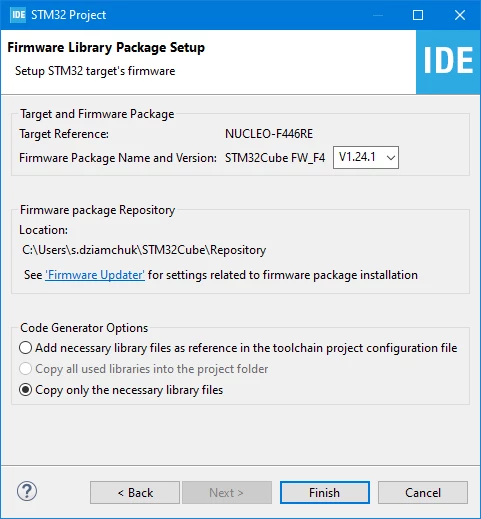
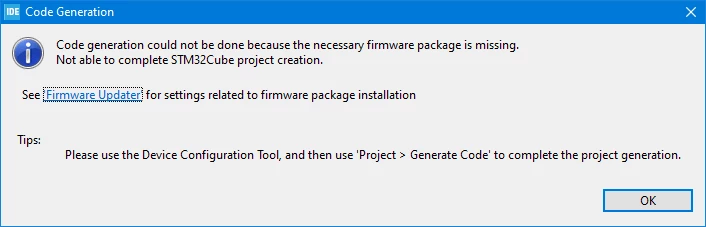
Get error message "Code generation could not be done because the necessary firmware package is missing. Not able to complete STM32Cube project creation."

When Creating STM32Cube Project and then giving Finish will result the following
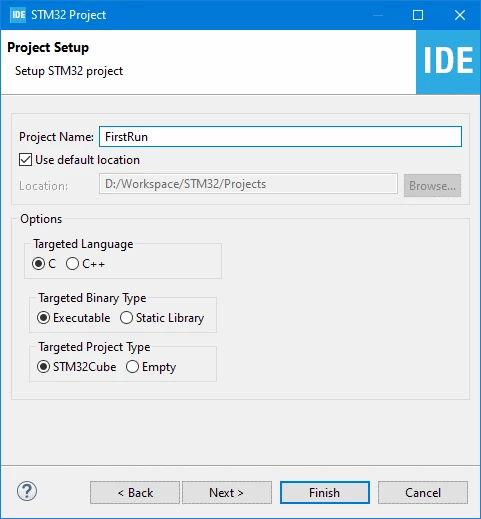
0690X00000AsENvQAN.png0690X00000AsENqQAN.png

0690X00000AsENgQAN.png

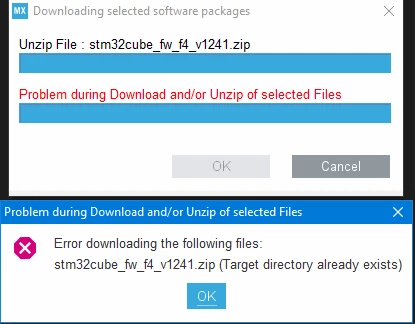
Also when downloading and unpacking software packages I get error when unpacking stm32cube_fw_f4_v1241.zip
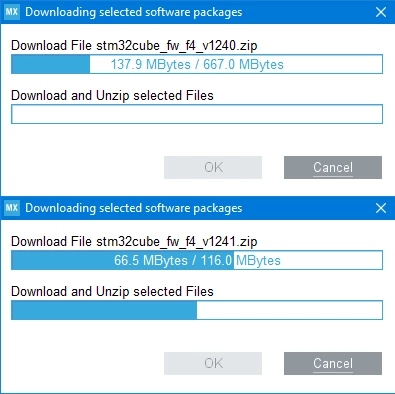
0690X00000AsETyQAN.png0690X00000AsEU3QAN.png

If I select V1.24.0 package I get the same error (Problem during Unzip stm32cube_fw_f4_v1241.zip)

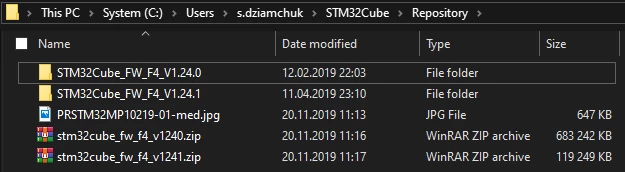
When I manually unzip v1.24.0 and v1.24.1 to different folders (like screen below) I still get Code Generation error.
0690X00000AsEZrQAN.png

I am using

STM32CubeIDE V1.1.0

Nucleo-F446RE board

Best answer by Reactor

Here is solution!

1) From this page https://www.st.com/en/embedded-software/stm32cubef4.html download two zips (STM32CubeF4 and Patch-CubeF4)

2) Unpack first en.STM32Cube_FW_F4_V1.24.0.zip to Repository folder

3) Then unpack en.patch_cubefw_f4.zip to the same folder with file replacement

4) Done!

8 replies

MTrio.1465
Associate
November 20, 2019

Hi,

same error, i don't know why. Can i ask you which cpu have on you pc?

Reactor
ReactorAuthor
Associate II
November 20, 2019

Intel Core i3-7100

MTrio.1465
Associate
November 20, 2019

I try 1000 different solution, and only in my pc doesn't work. I've installed the ide on different pc and the error did not appear. If you find a good solution could you please send me a message i would be grateful.

Cartu38 OpenDev
Graduate II
November 20, 2019

@Reactor, unzipping within 2 various folders is not process IDE is intending to do. Please have a try to unzip within same directory.

F4_V1.24.0 is main FW pack delivery ... F4 V1.24.1 is only kind on patch to be applied on main delivery. If you have a look to .zip file size (or extracted material) you will confirm F4 V1.24.1 is missing some material ....

Back to question why IDE process is failing ??? But if able to unzip as expected by your own such FW pack & related patch maybe you will succeed to at least get your code generation running.

According your snapshot sounds you have some dot '.' within your end use name ... maybe root of issue ? May you have a try updating at IDE session start to update FW pack repository path to another place ? Windows > Preferences > STM32Cube > Firmware updater ....

Reactor
ReactorAuthor
Associate II
November 21, 2019

In two other PC with the same configuration I have no this problem. Also username have spaces and dots and all works fine.

---

Well... The real problem is IDE can't replace files during unzip.

Reactor
ReactorAuthorBest answer
Associate II
November 21, 2019

Here is solution!

1) From this page https://www.st.com/en/embedded-software/stm32cubef4.html download two zips (STM32CubeF4 and Patch-CubeF4)

2) Unpack first en.STM32Cube_FW_F4_V1.24.0.zip to Repository folder

3) Then unpack en.patch_cubefw_f4.zip to the same folder with file replacement

4) Done!

MTrio.1465
Associate
November 21, 2019

Hi, i've just try your solution but still not working. I've done this step:

1) i have create new ST32 project in STM32CubeIde

2)I have selected the board, in my case STM32L475VGX, then i click next, write the project name and then it shows the error(code generation could not be done because the necessary firmware package is missing).

3)After that i follow your steps, but error appeared again

Did I do something wrong?

Pavel A.
Super User
November 21, 2019

You can see the "final" state of the F4 library on github. There it already contains the 1.24.1 patch.

-- pa

Cartu38 OpenDev
Graduate II
November 21, 2019

About FW pack install issue possibly some local issue (FW pack locked by another process or ?) Good trick if facing back issue could be to get a try purging your current repository (i.e. here removing first any *F4_V1.24* material)

Associate II
December 21, 2023

If the official patch solution didn't work for you, try changing of the Workspace path to another one that doesn't contain the "&" sign in it. Probably, other specific characters like #, %, etc. or non-English letters can brake the prcess as well.

Visitor II
January 24, 2024

I too had the same problem to avoid this change the location of the repository to 'd' drive for 'c' drive then again from the start create project once again the ide start to download the firmware for the board,now the problem is solved.

Visitor II
May 4, 2024

I encountered a similar issue where I was unable to download and unzip the firmware files in STM32CubeIDE. Upon investigating, I navigated to Windows > Preferences > STM32Cube > Firmware updater and realized that my Firmware installation repository was set to the C:\ drive, which lacked sufficient space. To resolve this, I established a new repository on the D:\ drive and updated the Firmware installation repository path to this new location. After restarting my computer, the problem was resolved, and everything functioned correctly.

I hope this solution helps others facing similar issues!


Visitor II
December 25, 2024

Hello, I encounter same issue and tried to follow your suggestion, but it does not help. Could you attach the photo how to solve the issue step by step please.


Thank you very much in advance.

Visitor II
September 3, 2024

I am running the cube IDE in ubuntu OS. I stumbled upon the same issue. However, the cause for me was different. I was prompted by the application to login to myST using the rightmost option in the top menu bar. Once, I logged in using my myST credentials, the firmware was downloaded and the introductory code was generated.