
Associate
December 28, 2025
Solved

Code Generation Issue Version 1.19.0 Locked due to Version 2.0.0

  • December 28, 2025
  • 2 replies
  • 1249 views

Hello.

Due to reasons, I had to completely reset my laptop, and I am setting up STMCubeIDE and STMCubeMX again. That said, I became used to CubeMX being integrated inside of CubeIDE and I want my project generation to include the .ioc file. Hence, I'm choosing to install STM32CubeIDE 1.19.0 (despite the documented issues and reasoning for Version 2, I have yet to encounter a serious problem that would steer me away). 


That said, after reinstalling STM32CubeIDE version 1.19.0, the code generation is locked behind an error message:
`Go to Help -> STM32Cube updates -> Connection to myST`. When I go to `Help->Check for Updates`, the only update available is to STM32CubeIDE 2.0.0. As I've explained above, I've been actively avoiding this version due to the removal of CubeMX integration in CubeIDE. 


Seeing as this was the only update, I tried to simply go to`Project -> Generate Code`, but nothing happened. 


This leads me to believe that for new installations of STM32CubeIDE for prior versions, it forces updates to the latest version (2.0.0 at time of writing). If that's the case, why bother allowing downloads to prior versions at all?


I write this in both frustration and hope that I am mistaken, and that there is an easier solution I am missing at the moment.


Any and all hints, tips, speculations, and solutions are welcome. Thank you for your time and consideration.

Best answer by TDK

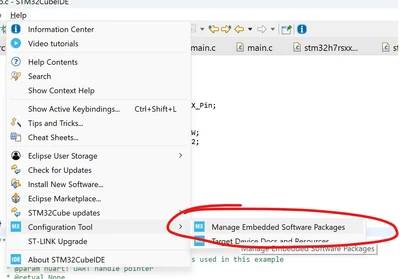
It needs the H7 software package to generate the code, hence the error message.

Go to manage embedded software packages and download the latest H7 package.

TDK_0-1766971371809.png

It might need a different package as well depending on what you enabled.

You may need to log in for some of them:

TDK_1-1766971451994.png


2 replies

TDK
Super User
December 28, 2025

It doesn't force you to update, but if you ask it if new versions are available, it will tell you they are. No surprises there.


> Seeing as this was the only update, I tried to simply go to`Project -> Generate Code`, but nothing happened. 

Probably an issue with how the project was created. How was it created and/or imported? If you create a new project, what happens when you try to generate code? Show screenshots of the error and workspace.

"If you feel a post has answered your question, please click ""Accept as Solution""."
C24Author
Associate
December 29, 2025

My error message looks like:

C24_5-1766966461392.png

C24_6-1766966733349.png


The pages where I make it looks like:

C24_2-1766966360413.png


C24_1-1766966338990.png

C24_3-1766966374693.png

C24_4-1766966410407.png


At first, I thought I needed to use this solution: https://community.st.com/t5/stm32cubeide-mcus/myst-login-issue-in-stm32cubeide/td-p/575447. However, I thought that with the settings below "these were not the same problems".

C24_0-1766966166364.png


The only things I can brainstorm are STM32 hides their libraries behind a paywall (the email must be connected to a purchased stm32 board) and that this email is not the one I used to buy the account, or that I am not signed in elsewhere on the toolchain (I mean to say not signed in to a connecting software).I am still an overall coding beginner so I am unsure how valid this hypothesis is.

Pavel A.
Super User
December 29, 2025

The only things I can brainstorm are STM32 hides their libraries behind a paywall (the email must be connected to a purchased stm32 board)

Definitely no - you just should have account (login) which you have as you're posting here.

Try to recall which CubeIDE version and Cube libraries you had before the reinstall, and download exactly same versions. Do only one thing at a time: first get working as it was, then consider update CubeIDE or libraries (or don't).


TDK
TDKBest answer
Super User
December 29, 2025

It needs the H7 software package to generate the code, hence the error message.

Go to manage embedded software packages and download the latest H7 package.

TDK_0-1766971371809.png

It might need a different package as well depending on what you enabled.

You may need to log in for some of them:

TDK_1-1766971451994.png


"If you feel a post has answered your question, please click ""Accept as Solution""."
C24Author
Associate
December 30, 2025

Thank you for your help and your patience. This worked to generate the code.


The display `Go to Help -> STM32Cube updates -> Connection to myST` led to a misunderstanding on my part that this required an update to fix, not the board packages needing to be installed. 


Once again, thank you.