
ADrub.1
Associate II
November 24, 2025
Solved

Colors in CubeIDE on Linux

  • November 24, 2025
  • 2 replies
  • 785 views

Hi! I have Linux Mint 22.2. How can I configure CubeIDE colors so that all windows have a white background? Various combinations of Windows->General->Appearance settings allow you to achieve a maximum white background for all windows except the one where you edit the code.

Version CubeIDE 2.2.0

Best answer by AScha.3

Hi,

did you try basic color setting, not dark (as i have) , but light ...?
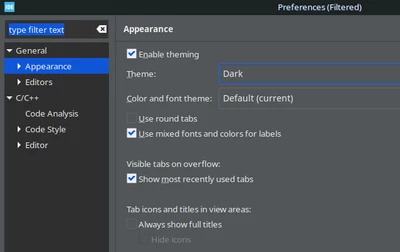
AScha3_0-1764020324473.png

+

>allow you to achieve a maximum white background for all windows except the one where you edit the code.

afair this is from system default , somewhere (!) you can change this to custom color...but i dont remember now, was searching some time for this.

...like this:
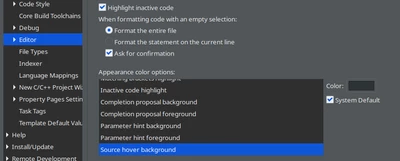
AScha3_1-1764020654342.png


2 replies

Technical Moderator
November 24, 2025

Hello @ADrub.1 

Thank you for posting!

Have you tried to switch the Colors and font theme as "Default"?

To give better visibility on the answered topics, please click on Accept as Solution on the reply which solved your issue or answered your question.
ADrub.1
ADrub.1Author
Associate II
November 24, 2025

I tried it. Here are the default values.

AScha.3
AScha.3Best answer
Super User
November 24, 2025

Hi,

did you try basic color setting, not dark (as i have) , but light ...?

AScha3_0-1764020324473.png

+

>allow you to achieve a maximum white background for all windows except the one where you edit the code.

afair this is from system default , somewhere (!) you can change this to custom color...but i dont remember now, was searching some time for this.

...like this:

AScha3_1-1764020654342.png


"If you feel a post has answered your question, please click ""Accept as Solution""."
ADrub.1
ADrub.1Author
Associate II
November 25, 2025

Most likely, this problem can only be solved by selecting a light background for applications in the Linux Mint settings.
