Associate
July 13, 2025
Question

Creating STM32 project by CUBE IDE cann't generate the .ioc file

  • July 13, 2025
  • 3 replies
  • 538 views

Hi all,

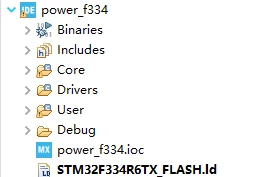
I use the STM32CUBE IDE (version:1.18.1) on windows 10. I can not create a normal stm32 project recently, because CUBEIDE cannot generate the .ioc file.

Jiahong_0-1752399831343.png

(a) Abnormal code architecture

Jiahong_1-1752399908841.png

(b) Normal code architecture(reference)

If you know how to handle this, thank you very much for telling me.

3 replies

STTwo-32
Technical Moderator
July 13, 2025

Hello @Jiahong 

To resolve this problem, you should update your STM32CubeIDE to the latest version 1.19.0, which is available under this link.

Best Reagrds.

STTwo-32

Associate
July 13, 2025

i have tried in that way to , installed the latest version and tried to open in all that way too, i couldnt get ioc file in the new version too. is there any other ways that i can try to get the generation of ioc files 

STTwo-32
Technical Moderator
July 13, 2025

What is the last version that you are using. And are you creating your own project or trying to open an existing project. Could you try to generate your project using the standalone version of the STM32CubeMX to the last version of the STM32CubeIDE.

Best Regards
STTwo-32

AScha.3
Super User
July 13, 2025

Hi,

so...just :


Please try to

-Close STM32CubeIDE

-Delete all those files from your PC: .stm32cufinder, .stm32cubemx, .stm32cubeide and .stm32cube 

AScha3_0-1752429783076.png


then restart the STM32CubeIDE and retest again.


"If you feel a post has answered your question, please click ""Accept as Solution""."
CTapp.1
Senior III
July 15, 2025

Thanks, that worked for me with 1.18.1

All posts are made in a personal capacityMISRA C++ ChairMISRA C WG MemberDirector The MISRA Consortium Limited (TMCL)