

ferro
Lead
October 8, 2024
Solved

CubeIDE 1.16 is requiring code generation with every press of Ctrl+B

  • October 8, 2024
  • 3 replies
  • 1779 views

Hi,

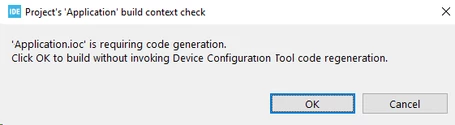
I've just installed CubeIDE 1.16 and without any change to code/source file, every press of Ctrl+B shows this dialog:
ferro_3-1728384274540.png


Any idea why this message please ?   I did not have this with IDE1.14.


Thanks

Best answer by Toneski

Hi Ferro,

It looks like because you have upgraded/changed CubeIDE,  that possibly the HAL drivers for your project need updating. Press the Cog wheel icon - or menu <Project/Generate Code>. This should update any source to the version of CubeIDE you are using. I think the compile should then work with Ctrl-B.

Cheers,

Toneski.

3 replies

Technical Moderator
October 9, 2024

Hello @ferro ,

First let me thank you for posting.

I suggest that you take a look at the Keyboard Shortcuts by clicking on Ctrl+Shift+L.

You can see that Ctrl+B stands for Build All.


MahmoudBenRomdhane_0-1728466318071.png


Thanks.

Mahmoud


To give better visibility on the answered topics, please click on Accept as Solution on the reply which solved your issue or answered your question.
ToneskiBest answer
Associate II
October 9, 2024

Hi Ferro,

It looks like because you have upgraded/changed CubeIDE,  that possibly the HAL drivers for your project need updating. Press the Cog wheel icon - or menu <Project/Generate Code>. This should update any source to the version of CubeIDE you are using. I think the compile should then work with Ctrl-B.

Cheers,

Toneski.

ferro
ferroAuthor
Lead
October 21, 2024

Hi @Mahmoud Ben Romdhane , thanks for that.


Hi @Toneski 

Correct . Thank you. Sort of obvious for well seasoned Cube users I guess, or more observant individuals. As I did not know how to continue from that point, I started project from scratch and had not had that error again - for a while.

Until it happend again and re-gerating of files did it. It is some specific sequence of using Gfx, MX and Cube.
Luckily my project seems to be stable now.

Associate II
October 22, 2024

Hi ferro,

Yes - you need to rebuild all the HAL source files every-time you change the .IOC file. The .IOC file is the file that allows you to allocate pins, clocks & enable the hardware blocks within your device (like enabling & configuring a new SPI device will require a new code generation). So every-time you change something with the CPU you need to re-generate.

Its caught me out before...

Regards,

Toneski