Associate III
December 20, 2024
Question

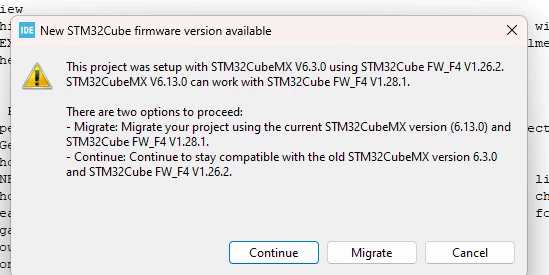
CubeMx error

  • December 20, 2024
  • 4 replies
  • 8793 views

hello i downdload latest version but again this error will come when i press migrate or continue option after that iam updating my code in this code  goes to  error part. fix this problem.
 

Screenshot 2024-12-20 133438.png

4 replies

Ghofrane GSOURI
Technical Moderator
December 20, 2024

Hello @syedhashmiraza 

Could you please explain more about the error that you are facing?

THX

Ghofrane

To give better visibility on the answered topics, please click on Accept as Solution on the reply which solved your issue or answered your question.
mƎALLEm
Technical Moderator
December 20, 2024

Hello,

Check if V1.28.1 is available in this path: C:/Users/<user name>/STM32Cube/Repository/

SofLit_0-1734688668123.png


"To give better visibility on the answered topics, please click on ""Accept as Solution"" on the reply which solved your issue or answered your question."
Associate III
December 20, 2024

syedhashmiraza_0-1734690830478.png


mƎALLEm
Technical Moderator
December 20, 2024

I mean check that you have STM32Cube_FW_F4_V1.28.1 folder at this drive location: C:/Users/Ciright/STM32Cube/Repository/

SofLit_0-1734691443326.png

Otherwise, check the checkbox: "Use Default Firmware Location":

SofLit_1-1734691643081.png

"To give better visibility on the answered topics, please click on ""Accept as Solution"" on the reply which solved your issue or answered your question."
mƎALLEm
Technical Moderator
December 20, 2024

@Ghofrane GSOURI could help you on that.

"To give better visibility on the answered topics, please click on ""Accept as Solution"" on the reply which solved your issue or answered your question."
Ghofrane GSOURI
Technical Moderator
December 20, 2024

Hello @syedhashmiraza 

Let's try this:

- Close the CubeMX.

- Go to C:\Users\XXXX    and delete .stm32cubemx

- Then Reopen the CubeMX 6.13.0 load your IOC.

THX

Ghofrane

To give better visibility on the answered topics, please click on Accept as Solution on the reply which solved your issue or answered your question.
Associate III
December 25, 2024

hello,When I integrate UART and generate and migrate  the code, my biometric code goes into the error part, but when I don't generate the code, my code runs properly. However, I need to integrate UART into it


mbarg.1
Senior III
December 21, 2024

This is NOT an ERROR.

It is a SWITCH between 2 options.

In xx.ioc editor,  project manager tab, check if "Use latest version" is checked.

If checked, every time you start edit an .ioc you can decide between 2 options, old version or new version

Associate III
December 25, 2024

hello,When  i  generate and migrate  the code, my biometric code goes into the error part, but when I don't generate the code, my code runs properly. However, I need to integrate UART into it.


mbarg.1
Senior III
December 25, 2024

According to my experience, if you migrate and get some error, it is due to differences between different FW releases.

But if you get an error with continue it is because 

A - you changed some line of FW code and system restores original version

B - you put some code outside /* USER CODE BEGIN */  and /*USER CODE END */ interval and again system deletes your code

Save a copy of all your C files with cx file suffix, than run migrate or continue, than compare (grep if you use linux) alla files an find what has changed - you will find one of two situations above.

Anyway, Marry Christmas!
