Associate III
March 4, 2025
Solved

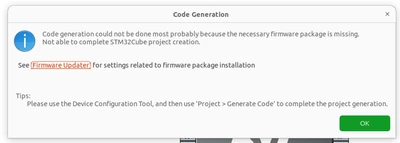
CudeIDE , does'nt generate any Code File

  • March 4, 2025
  • 1 reply
  • 588 views

Hallo Everyone,

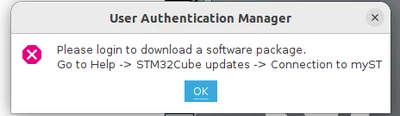
i am kindly new on STM and i am starting with some Basics programming stuff using a Ubuntu PC and  the NUCLEO-F401RE. However after installing the Ubuntu Version with the "STM32CubeIDE Debian Linux Installer",  i started a new Projekt and i configured the Pins, and after that when i tried to generated the the code files it did'nt work at all. In the Projekt Folder there is just one ioc file to be see and nothing else. I tried "Project-> generate Code" but nothing, also "Help -> STM32Cube updates" nothing changed. Has anyone an idea of what  could help me here!


Kinds regards

Screenshot from 2025-03-04 12-51-56.pngScreenshot from 2025-03-04 12-38-40.pngScreenshot from 2025-03-04 12-38-13.png

Best answer by mƎALLEm

Hello @kgb and welcome to the community.

It seems you are missing the CubeF4 package to generate the code. 

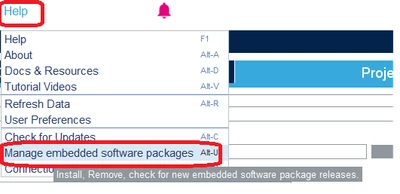
Try to go to "Help", then Click on "Manage embedded ..."

mALLEm_2-1741090282423.png

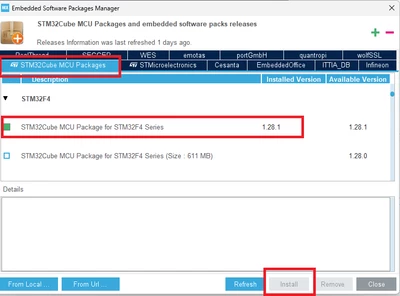
In the "STM32Cube MCU Packages" tab, check the latest version of the Cube package and click on Install button

mALLEm_1-1741090219099.png

Hope that solves your issue.


1 reply

mƎALLEm
mƎALLEmBest answer
Technical Moderator
March 4, 2025

Hello @kgb and welcome to the community.

It seems you are missing the CubeF4 package to generate the code. 

Try to go to "Help", then Click on "Manage embedded ..."

mALLEm_2-1741090282423.png

In the "STM32Cube MCU Packages" tab, check the latest version of the Cube package and click on Install button

mALLEm_1-1741090219099.png

Hope that solves your issue.


"To give better visibility on the answered topics, please click on ""Accept as Solution"" on the reply which solved your issue or answered your question."
kgbAuthor
Associate III
March 4, 2025

@mƎALLEm  Thanks for the solution