
Associate II
January 16, 2025
Question

Debug a Zephyr project in STM32CubeIDE - Windows

  • January 16, 2025
  • 2 replies
  • 1169 views

Hi All,

I'm trying to setup STM32CudeIDE 1.17.0 to build and debug my Zephyr OS project (STM32H745).  Mainly to get access to the dual core debugging features that the IDE provides.

I found Zephyr has a page to guide setup on a Linux machine, but the same menu options don't appear in the Windows version? 
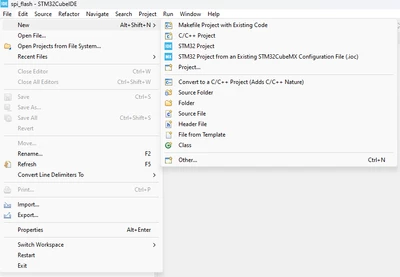
Simon33rd_0-1737015528712.png

There is no option for STM32 CMake Project?

The other thing that would work was if I could just debug by pointing to pre-built .elf files.  Can this be setup?

Regards

Simon 

2 replies

ST Employee
April 28, 2025

Hello @Simon33rd

This solution is not yet tested on windows! But some users were able to build and debug zephyr using STM32CubeIDE: Improved Eclipse usage · zephyrproject-rtos/zephyr · Discussion #69812 

>>There is no option for STM32 CMake Project?

STM32CubeIDE now supports CMAKE (with newer versions), try starting from STM32CubeMX and generating a CMAKE file.

Also, note that STM32CubeMX- generated code cannot be used if you intend to use Zephyr drivers because the zephyr configuration is done using device tree. 


Pavel A.
Super User
April 28, 2025

> I could just debug by pointing to pre-built .elf files.  Can this be setup?

Yes, this is described in the CubeIDE manual. Basically this creates a new simple "makefile" style Eclipse (CubeIDE) project, it will have debug configuration in the CubeIDE debugger.  You need an existing eclipse workspace where this project will be created. Later you can provide source and include paths for the debugger,  provide the "build" command for this project (run make or CMAKE...) and so on as you like.