
Associate
October 24, 2024
Solved

Enable C++23 on custom toolchain

  • October 24, 2024
  • 1 reply
  • 1421 views

Hello,

I would like some guidance on how to setup the STM32CubeIDE to allow me to use C++23 on the ARM toolchain I usually use.

The ARM toolchain is setup correctly but in the project's properties>C/C++ Build>MCU/MPU G++ Compiler>General, the language standard cannot go as high as iso or gnu C++20. Is there any way to write a value myself or do I have to use an external CMake.

Thanks for your help,
Best answer by Marmelade

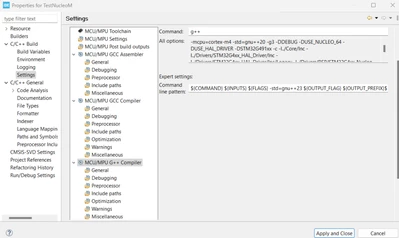
I just found a way to override the options of cubeIDE, you have to go to Project>Properties>C/C++ Build>MCu/MPU G++ Compiler and on Experts settings, add to the comman line pattern -std=gnu++23 after the ${FLAGS}. Because the gnu++23 is after whatever cubeIDE selected, your c++ standard option will be selected by G++.

Marmelade_0-1730731296859.png

I hope this will help anyone.

1 reply

MarmeladeAuthorBest answer
Associate
November 4, 2024

I just found a way to override the options of cubeIDE, you have to go to Project>Properties>C/C++ Build>MCu/MPU G++ Compiler and on Experts settings, add to the comman line pattern -std=gnu++23 after the ${FLAGS}. Because the gnu++23 is after whatever cubeIDE selected, your c++ standard option will be selected by G++.

Marmelade_0-1730731296859.png

I hope this will help anyone.