

Nsg1987
Associate III
August 9, 2023
Solved

Error: failed to erase memory

  • August 9, 2023
  • 10 replies
  • 27330 views

Hi,

While flashing code in STM32G474VBT6, I am getting below error. After reinstalling cube ide and cube programmer, same error continues.


STMicroelectronics ST-LINK GDB server. Version 7.4.0

Copyright (c) 2023, STMicroelectronics. All rights reserved.


Starting server with the following options:

Persistent Mode : Disabled

Logging Level : 1

Listen Port Number : 61234

Status Refresh Delay : 15s

Verbose Mode : Disabled

SWD Debug : Enabled

InitWhile : Enabled


Waiting for debugger connection...

Debugger connected

Waiting for debugger connection...

Debugger connected

Waiting for debugger connection...

-------------------------------------------------------------------

STM32CubeProgrammer v2.14.0

-------------------------------------------------------------------


Log output file: C:\Users\NIKHIL~1\AppData\Local\Temp\STM32CubeProgrammer_a02888.log

ST-LINK SN : 68005200040000363036544E

ST-LINK FW : V2J42S7

Board : --

Voltage : 3.26V

SWD freq : 4000 KHz

Connect mode: Under Reset

Reset mode : Hardware reset

Device ID : 0x469

Revision ID : Rev X

Device name : STM32G47x/G48x

Flash size : 128 KBytes

Device type : MCU

Device CPU : Cortex-M4

BL Version : 0xD5

Debug in Low Power mode enabled


Memory Programming ...

Opening and parsing file: ST-LINK_GDB_server_a02888.srec

File : ST-LINK_GDB_server_a02888.srec

Size : 73.29 KB

Address : 0x08000000


Erasing memory corresponding to segment 0:

Error: Operation exceeds memory limits


Error: failed to erase memory

Encountered Error when opening C:\ST\STM32CubeIDE_1.13.1\STM32CubeIDE\plugins\com.st.stm32cube.ide.mcu.externaltools.cubeprogrammer.win32_2.1.0.202305091550\tools\bin\STM32_Programmer_CLI.exe.

Error in STM32CubeProgrammer

Shutting down...

Exit.
 

Nsg1987_0-1691554608910.png

Can anyone help me to get solution?

Thanks

Nikhil


@Sara BEN HADJ YAHYA 


    Best answer by RhSilicon

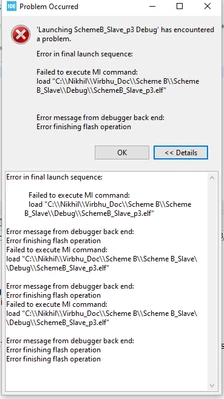
    I just installed STM32CubeIDE v1.13.1 and got the same "failed to execute MI command" error.

    But the error does not occur with IDE v1.12.1 (since it's the same project).

    I'm using IDE 1.12.1 because there have been several reports of BUGs with version 1.13, and I've only just installed this version in a virtual machine to test it, but I shouldn't use this version for now, version 1.12.1 already suits my projects at the moment.

    10 replies

    RhSilicon
    Lead
    August 9, 2023

    I remember something similar happening, which only the ST-link utility was able to resolve by performing a complete FLASH erase.

    https://www.st.com/en/development-tools/stsw-link004.html

    Nsg1987
    Nsg1987Author
    Associate III
    August 9, 2023

    Hello @RhSilicon 

    I did the full chip erase with STM32CubeProgrammer. But still error is present.

    Nsg1987_0-1691556467401.png


    RhSilicon
    RhSiliconBest answer
    Lead
    August 9, 2023

    I just installed STM32CubeIDE v1.13.1 and got the same "failed to execute MI command" error.

    But the error does not occur with IDE v1.12.1 (since it's the same project).

    I'm using IDE 1.12.1 because there have been several reports of BUGs with version 1.13, and I've only just installed this version in a virtual machine to test it, but I shouldn't use this version for now, version 1.12.1 already suits my projects at the moment.

    RhSilicon
    Lead
    August 9, 2023

    The error stopped occurring after selecting the ST-Link frequency from Auto to 8000kHz. There may be some ST-Link speed identification failure.

    ST-Link_error_MI_cmd.png

    HMoens
    Graduate
    August 10, 2023

    I have the same issue 1.12.1 works but 1.13.1 doesn't 

    Nsg1987
    Nsg1987Author
    Associate III
    August 10, 2023

    Hello @HMoens 

    Yeah Agree with you. 

    ManuTest
    Visitor II
    November 29, 2023

    I had the same weird erase problem with 1.13 - it worked with older versions and also with STM32CubeProgrammer I can still erase and program the microcontroller (STM32G473 in my case) without a problem using the same ST-LINK/V2 and same frequency setting.

    Now I tried the new Version 1.14 - still same problem.

    For a product like the STM32CubeIDE, which is still actively developed, it is inacceptable to be forced to use an old version. Calling this downgrade a "solution" is an outrage.

    Graduate
    February 9, 2024

    I was experiencing the same error on my NUCLEO-WB55RG. It was due to a few things related to my un-orthodox setup.

    Setup:

    1.) NUCLEO-WB55RG is setup as an I2C Slave connected to Master STM32F7 controller. Powering of the NUCLEO-WB is from the STM32F7 controller.

    2.) NUCLEO-WB55RG project is loading the X-CUBE-TOUCHGFX, Note: Still awaiting delivery of my GFX01M2 card


    First issue (Error: failed to erase memory) was related to the Power source of the NUCLEO-WB.

    Resolution: The JP1 jumpers for the NUCLEO-WB need to be set too 5V EXT, thus supplying power for the St-Link and the Board itself.


    Second Issue (Failed to initialize external memory!) Related to initializing QSPI when the address is not addressable.


    STMicroelectronics ST-LINK GDB server. Version 7.5.0

    Copyright (c) 2023, STMicroelectronics. All rights reserved.


    Starting server with the following options:

    Persistent Mode : Disabled

    Logging Level : 1

    Listen Port Number : 61234

    Status Refresh Delay : 15s

    Verbose Mode : Disabled

    SWD Debug : Enabled

    InitWhile : Enabled


    Failed to initialize external memory!

    Resolution: Temporarily disable the External Loader in the Debug configuration.

    mikez33308_0-1707517594300.png

    WIN_20240209_17_32_40_Pro.jpg

     Hope this saves someone's time.

    ManuTest
    Visitor II
    February 9, 2024

    Thanks, that is good to know! Surely, the error can be caused by different problems.


    But the thing discussed here is about the problem with the STM32CubeIDE.

    The debugging of STM32G4xx just wouldn't work with IDE 1.13 and 1.14 - which was clearly a bug.

    Accessing the CPU with the STM32CubeProgrammer always worked so I could rule out hardware issues.

    But now - good news: They finally fixed it. Version 1.14.1 works again (for me).

    Associate III
    February 21, 2024

    Hey!
    i faced same error when i was trying to write flash memory  for stm32
    i changed debug configurations for that project.

    need to change Reset Behaviour to None which comes under debugger tab of debug configurations.
    i hope this resolves the error

    RDrum.1
    Associate II
    June 10, 2025

    I faced this issue for a while. After trying all the things listed above, and having mixed results, I discovered that I had a problem on the Reset line.

    It was being loaded by some other circuitry - newly plugged in - and was resting near the 'reset threshold' voltage. So occasionally the MCU would reset, just after connecting to the STlink, causing whatever was happening (usually erase) to fail.

    Fixed the reset level- problem went away.

    HTH.

    jumman_JHINGA
    Senior III
    June 16, 2025

    In my case, my STM32H747 got locked due to certain power configuration settings selected in CubeMX. Every time I tried to flash the code, I kept encountering an error.

    To resolve this, I pulled the BOOT0 pin low and performed a full chip erase using STM32CubeProgrammer. After that, the issue was completely resolved.

    Since then, I’ve made it a point to keep STM32CubeIDE and CubeMX updated regularly, and I haven’t faced this problem again in any of the latest versions.

    Javier1
    Principal
    June 16, 2025

    every time i have updated Cube Ide something breaks, no exceptions. (7 years experience now)
    I guess you were lucky or i was not.

    hit me up in https://www.linkedin.com/in/javiermuñoz/