

isikli
Associate II
January 9, 2026
Solved

Feature Request: Keyboard shortcut to move editor to split view

  • January 9, 2026
  • 2 replies
  • 317 views

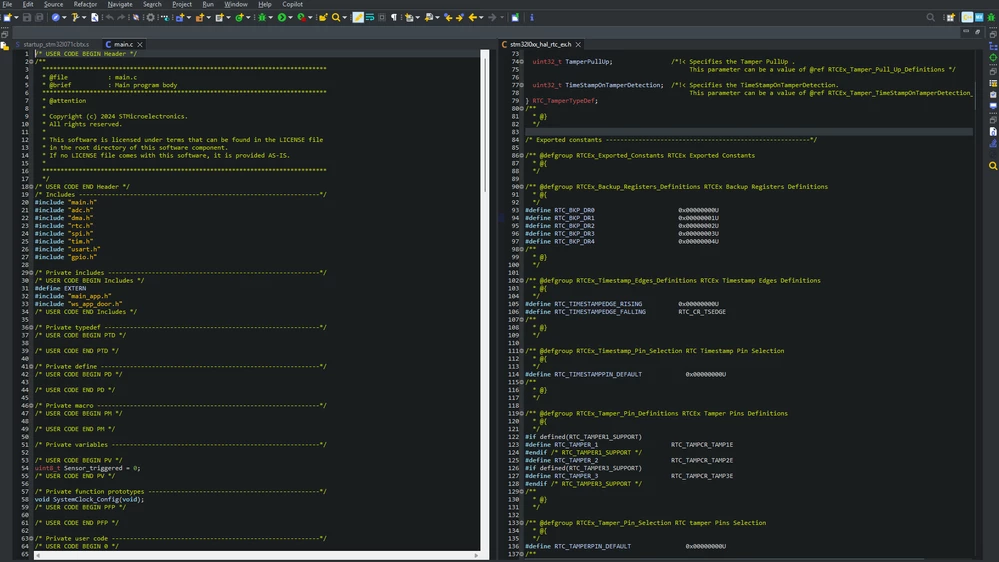
In STM32CubeIDE, it is possible to view two different source files side by side by dragging editor tabs with the mouse. However, there is no keyboard shortcut or command to move the active editor to the left/right split.

This slows down workflow when frequently comparing files (e.g., main.c and app.c). A command such as “Move editor to right/left split” with assignable key binding would greatly improve productivity.

Best regards.image.png
Best answer by Ghofrane GSOURI

Hello @isikli 

Your change request has been forwarded to the development team for a feasibility assessment under internal ticket ID 224836.

I will keep you informed as soon as there are updates.

THX

Ghofrane

2 replies

Ghofrane GSOURI
Ghofrane GSOURIBest answer
Technical Moderator
January 9, 2026

Hello @isikli 

Your change request has been forwarded to the development team for a feasibility assessment under internal ticket ID 224836.

I will keep you informed as soon as there are updates.

THX

Ghofrane

To give better visibility on the answered topics, please click on Accept as Solution on the reply which solved your issue or answered your question.
Andrew Neil
Super User
January 9, 2026

I think this would be a core Eclipse thing - not specific to CubeIDE?

So might be worth searching general Eclipse stuff, or asking in a general Eclipse forum ... ?

A complex system that works is invariably found to have evolved from a simple system that worked.A complex system designed from scratch never works and cannot be patched up to make it work.