NCatt.1
Associate III
January 10, 2025
Question

Folder settings are different than project settings

  • January 10, 2025
  • 3 replies
  • 694 views

Hello, 

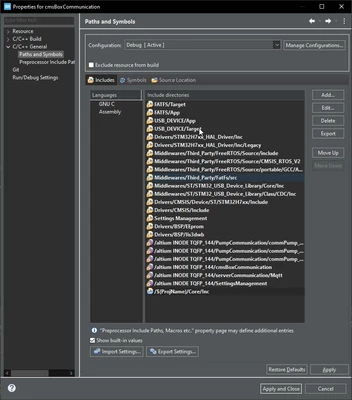
I just imported a shared project from DevOps and I had to change some absolute paths to project relative paths in Project Properties-C/C++ General-Paths and Symbols-Includes.

Now I am still facing some errors like: "...No such file or directory".

When I check the folder where the file that generates this error is located, I see it does not have the same settings that I just set before in Paths and Symbols. I precise the folder is part of the project.

Here are project properties:
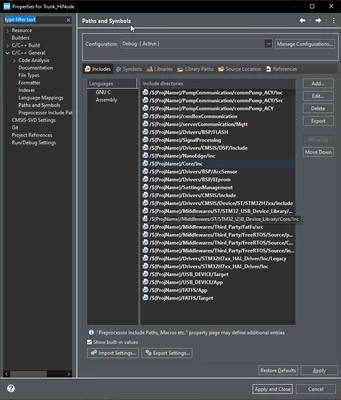
NCatt1_0-1736504943401.png

And here are folder properties:

NCatt1_1-1736504991838.png


3 replies

NCatt.1
NCatt.1Author
Associate III
January 10, 2025

Here is the project structure:

NCatt1_0-1736505212466.png

The folder that does not have project settings is "cmsBoxConfiguration", which has the "key" symbol. Folder with the blue C symbol have same properties than the project.

Is sometinh wrong with the project configuration ?

Technical Moderator
January 10, 2025

Hello @NCatt.1 

Make sure that the changes you made in the Paths and Symbols are applied across all configurations (e.g., Debug and Release). Sometimes, changes made in one configuration do not automatically propagate to others.

After making changes to the include paths, refresh the project by right-clicking on the project in the Project Explorer and selecting Refresh. Then, clean the project and rebuilding the project.

"When your question is answered, please close this topic by clicking ""Accept as Solution"".ThanksImen"
TDK
Super User
January 10, 2025

Those two screenshots are from different projects.

What is the exact error message? What project are you trying to compile?

"If you feel a post has answered your question, please click ""Accept as Solution""."