
Associate II
January 21, 2025
Solved

How to associate .cproject and .project files to STM32CubeIDE in Mac OS?

  • January 21, 2025
  • 4 replies
  • 1493 views

Hello.

Cube IDE has option in the settings to associate .cproject and .project files to STM32CubeIDE.
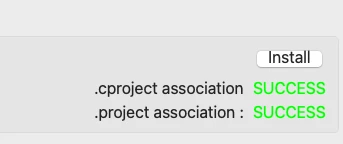
dibor_0-1737486219616.png

But nothing changed in the project folder :(
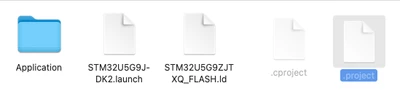
dibor_1-1737486320805.png

I have tried to give "full disk access" to the STM32CubeIDE application - but nothing change.
STM32CubeIDE application has ProjectImporter.app into the application package, but I do not know how to use it :(

If I try to do "open with" STM32CubeIDE -  .cproject file opens as xml file in STM32CubeIDE :(

How can I import project?


Thank U

Best answer by Pavel A.

Which import option to choose?

* If the project is created for CubeIDE or already converted to CubeIDE: choose "Existing projects into workspace".

* If the project is for SW4STM32:  choose "Import ac6 ..."  Unless the imported project is in the Projects subtree of a Cube firmware package. Then it is an example, so use "Import STM32Cube example". This will open a special GUI.

* If the project is for Atollic, choose Atollic.

* Else it is not importable automatically.

As for "No specific encoding" - ignore it.


4 replies

Pavel A.
Super User
January 22, 2025

It is best to NOT associate .project and .cproject files with CubeIDE, on any OS. Because these files can be Eclipse projects of any nature, STM32 or not. Also, consider that several CubeIDE versions are installed on one host. Which one should run? For this reason these files are "hidden". 

So how do you open these projects? Simple. Start the needed version of CubeIDE (or other Eclipse) and open the needed workspace. Then import the project into that workspace. Next time when you start the CubeIDE you can specify the default workspace to open automatically.

One could wish that opening .project files from OS shell would start some "version selector" like in MS Visual Studio, but someone should make that tool, and IMHO it's not worth it.

STM32CubeIDE application has ProjectImporter.app into the application package, but I do not know how to use it :(

Then, welcome to the User Guide )) As the ancient saying goes... if nothing helps - read the documentation ))

diborAuthor
Associate II
January 22, 2025

@Pavel A. wrote:

Then import the project into that workspace.


Hi.

Which import option to choose?

dibor_0-1737525041772.png

Without RTFM impossible to import ?


diborAuthor
Associate II
January 22, 2025

@unknown wrote:

you can try resetting STM32CubeIDE's preferences by going to ~/Library/Preferences and deleting the IDE settings


Hi.

dibor_0-1737572330979.png

I do not know what does mean :(


abt. ~/Library/Preferences, do U mean to remove com.st.stm32cube.ide.mcu.rcp.product.plist ??


Thank U

Pavel A.
Pavel A.Best answer
Super User
January 22, 2025

Which import option to choose?

* If the project is created for CubeIDE or already converted to CubeIDE: choose "Existing projects into workspace".

* If the project is for SW4STM32:  choose "Import ac6 ..."  Unless the imported project is in the Projects subtree of a Cube firmware package. Then it is an example, so use "Import STM32Cube example". This will open a special GUI.

* If the project is for Atollic, choose Atollic.

* Else it is not importable automatically.

As for "No specific encoding" - ignore it.


diborAuthor
Associate II
January 23, 2025

Thanks to ALL.