
Associate
January 22, 2025
Solved

How to find documentation of Target MCU within STM32CubeIDE application

  • January 22, 2025
  • 3 replies
  • 1104 views

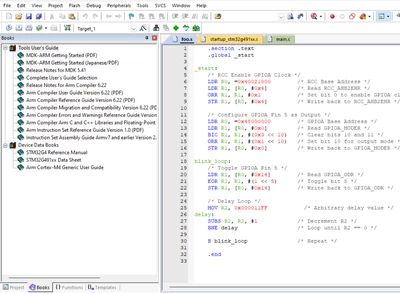
Kiel uvision has this feature where they show the pdf of relevant documentations when you select board and chip while creating a project. Does stm32cubeide have a similar feature somewhere so i can look for the stm i am using.

also i found it hard to find the same pdf on google for some reason, like i had to type specific phrases from the document in order to find it
AdilMC_0-1737544978797.png

above is photo with pdfs on the right
Best answer by Pavel A.

Finding the MCU documentation is very easy with CubeMX. (less so with CubeIDE).

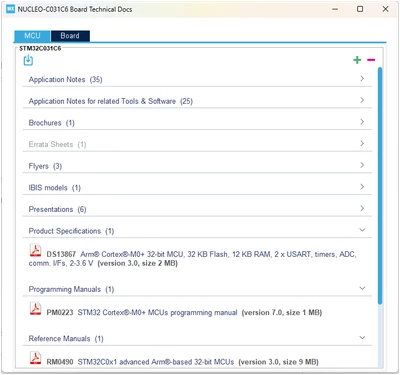
In CubeMX just select Help-> Docs and resources. Then select MCU tab. And here you are, all the PDFs for the MCU selected in the CubeMX (.ioc). On the board tab: all documents for the board (if available).


PavelA_0-1737583001368.png


3 replies

STTwo-32
Technical Moderator
January 22, 2025

Hello @AdilMC and welcome to the ST Community.

For the Documents that are related to the tool (STM32CubeMX,IDE,...) they are all available only on the webpage of the Product on the ST website. For the documents of the product that you are using, they are all available throw the standalone version of CubeMX:

STTwo32_0-1737546178986.png

Best Regards.

STTwo-32

Andrew Neil
Super User
January 22, 2025

You can place PDF files into the project folder, and the CubeIDE Project Explorer will show them, and double-clicking will open them in your default PDF viewer


PS:

It seems that double-clicking a PDF in the Project Explorer will both open it in your default PDF viewer and open it as a tab within the IDE!

Closing the IDE tab also closes the document in the default viewer;

Closing the document in the default viewer does not close the IDE tab.

A complex system that works is invariably found to have evolved from a simple system that worked.A complex system designed from scratch never works and cannot be patched up to make it work.
Pavel A.
Pavel A.Best answer
Super User
January 22, 2025

Finding the MCU documentation is very easy with CubeMX. (less so with CubeIDE).

In CubeMX just select Help-> Docs and resources. Then select MCU tab. And here you are, all the PDFs for the MCU selected in the CubeMX (.ioc). On the board tab: all documents for the board (if available).


PavelA_0-1737583001368.png