Associate III
April 28, 2025
Solved

How to include a downloaded library into STM32CubeIDE?

  • April 28, 2025
  • 2 replies
  • 942 views

Hello,


I have downloaded a library containing two files: the .h file and the .c  file:
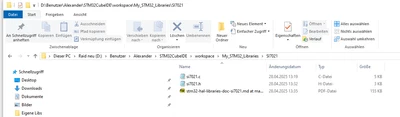
 

Lib.png

I used drag and drop and dropped the folder into the driver folder of my project. I selected them to be a reference and a relative path.
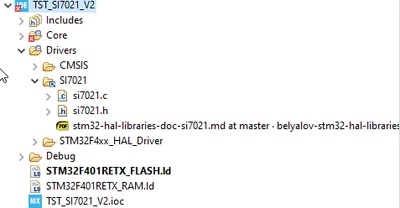
includeProblem.png


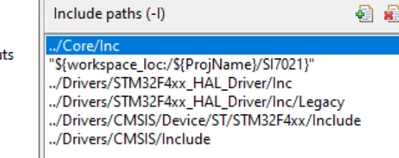
Then I selected the compiler include path:
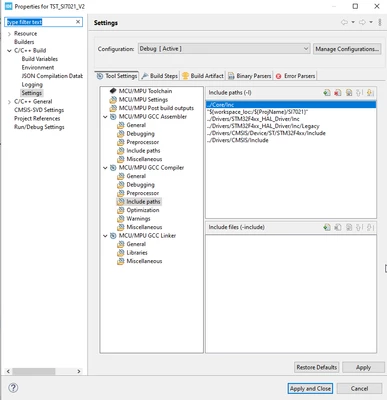
 

includeProblem2.png

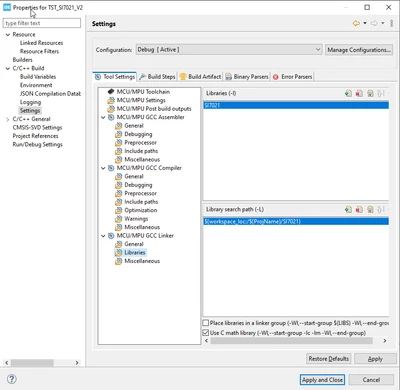
and the linker path

includeProblem4.png

The IDE is showing the resource correctly linked to the project:
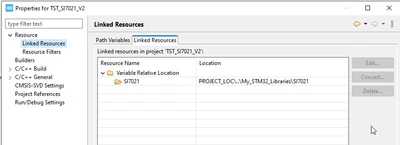
includeProblem3.png

when I build the project I still get the error message:
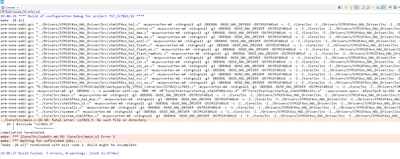
includeProblem0.png

What is wrong with my approach?

How do I set the paths correctly?

As a suggestion: I have found many users struggling with this. I would like to recommend a dialog for dropping a folder into the project with predefined links to the new folder.

Regards


Alexander
 

Best answer by TDK

It's in "<project>/Drivers/Si7021". Your paths assume it's in "<project>/Si7021".

TDK_0-1745862059709.png


To keep consistency, you could add "../Drivers/Si7021" as the path.

2 replies

TDK
TDKBest answer
Super User
April 28, 2025

It's in "<project>/Drivers/Si7021". Your paths assume it's in "<project>/Si7021".

TDK_0-1745862059709.png


To keep consistency, you could add "../Drivers/Si7021" as the path.

"If you feel a post has answered your question, please click ""Accept as Solution""."
DocAlexAuthor
Associate III
April 28, 2025

Thank you very much!

Another issue was that I had an include "-l" which was expecting an archive.

Regards


Alexander

Pavel A.
Super User
April 28, 2025

Unfortunately Eclipse is too complicated for beginners. 

What you want here is "Build variables", not "linked resources".

Also, what you call a library is just an additional source file for the purpose of the project. So you don't add it to the libraries & library search path. Libraries are ".a" files.