
Associate III
October 8, 2024
Solved

How to solve "Your IDE is missing natures to properly support your projects" in CubeIDE 1.16.1

  • October 8, 2024
  • 1 reply
  • 4490 views

Hi,

i am not able to create an example project because i always get the message "Your IDE is missing natures to properly support your projects" after i want to finish the project setup. 

What does this mean?
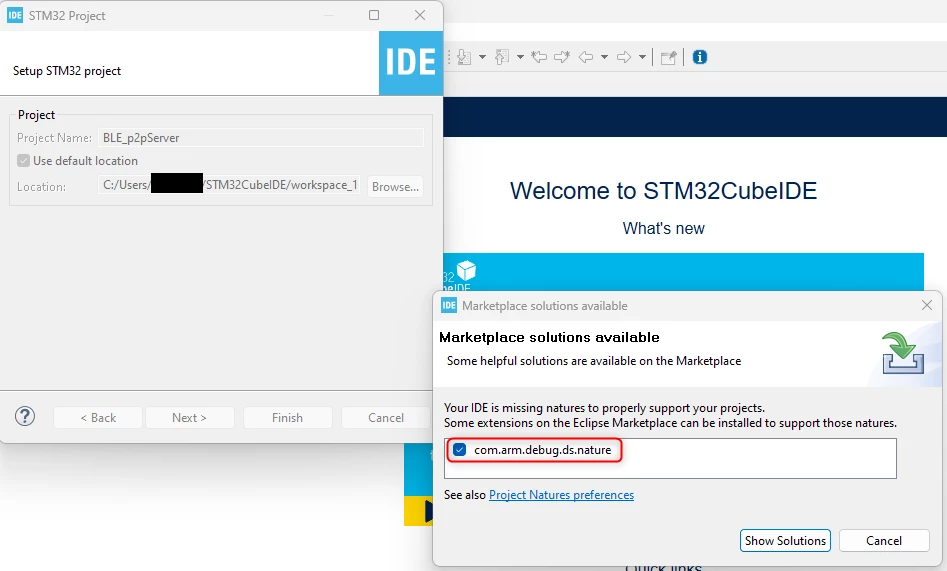
2024-10-08_09h37_15.png

If i cancle it, i am not able to build the project, because the "Hammer Symbol" is not active:
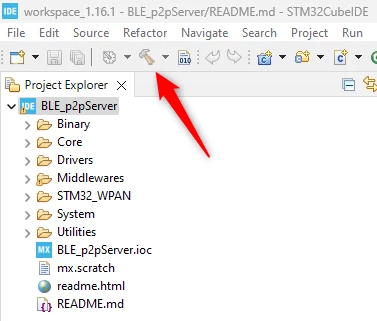
2024-10-08_09h43_14.png

in CubeIDE 1.14.1 for example it works.


Best answer by Imen.D

Hello @ledi7 ,

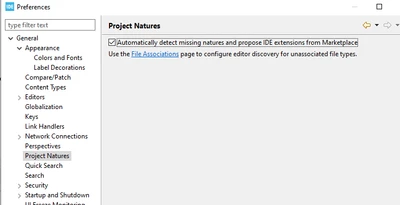
Try disabling the "Automatically detect missing natures and propose IDE extensions from Marketplace" in Window > Preferences: General > Project Natures.
ImenD_0-1728374963057.png

1 reply

Imen.DBest answer
Technical Moderator
October 8, 2024

Hello @ledi7 ,

Try disabling the "Automatically detect missing natures and propose IDE extensions from Marketplace" in Window > Preferences: General > Project Natures.
ImenD_0-1728374963057.png
"When your question is answered, please close this topic by clicking ""Accept as Solution"".ThanksImen"