
Associate
May 14, 2024
Solved

i can't log in myST

  • May 14, 2024
  • 9 replies
  • 7025 views

This is the first time I use STM32cubeIDE ver 1.15.1 . While using it, there are a few operations that need to be logged in. I already have an account in the practice room at school, but when I log in on my personal laptop, I see a box. "Authentication error manage" dialog as shown belowScreenshot 2024-05-14 171838.png
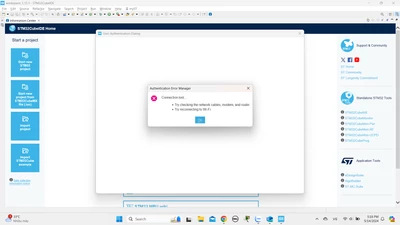
 

 meanwhile my internet connection is completely normal.


and here is my device information

Device name DESKTOP-4TDRFA4

Processor 11th Gen Intel(R) Core(TM) i5-1135G7 @ 2.40GHz  2.42 GHz

Installed RAM 8.00 GB (7.74 GB usable)

Device ID 996C43EE-CF99-4860-A14A-D9B1A6AE213A

Product ID 00356-24555-97786-AAOEM

System type 64-bit operating system, x64-based processor

Pen and touch No pen or touch input is available for this display


I don't know how to fix the above situation, I hope someone can assist me as soon as possible

It would be better if you guide me with pictures or videos, my English is not very good, please understand

You can contact me via 22200165@student.hcmus.edu.vn

sincerely thank !

    Best answer by mƎALLEm

    Dear all,

    Seems the issue has been solved please check from your side.

    9 replies

    Graduate II
    May 14, 2024

    I think a lot of people are having this problem today. Come on ST get it fixed. We are trying to do some work here.

    Visitor II
    May 15, 2024

    After wasting almost a full day trying to fix the same issue you encountered, I went through the changelogs and saw that ST started forcing the log in in version 1.13.0 so I installed version 1.12.1 and that seems to work fine.

    It's annoying having to use an old version, but well... Hope they fix this soon.

    Graduate II
    May 16, 2024

    Hi Ole1,

    Are you able to log in ?

    Then, are you able to upgrade to 1.151.1 ?

    Regards

    Graduate II
    May 16, 2024

    as said by @Ole1 :

    workaround: install CubeIDE 1.12.1

    It has no login functionnality and use latest packages.

    Ghofrane GSOURI
    Technical Moderator
    May 17, 2024

    Hello @dnht 

    First let me thank you for posting.

    The issue seems to be linked either to the server or the tool network connection settings.

    The possibility of having issue with the server is under investigation.

    If you are connected to the internet via a proxy, please follow the steps from the article bellow to set the tool correctly.

    How to set the network connection parameters for S... - STMicroelectronics Community


    KR,

    Ghofrane

    To give better visibility on the answered topics, please click on Accept as Solution on the reply which solved your issue or answered your question.
    mƎALLEm
    mƎALLEmBest answer
    Technical Moderator
    May 17, 2024

    Dear all,

    Seems the issue has been solved please check from your side.

    "To give better visibility on the answered topics, please click on ""Accept as Solution"" on the reply which solved your issue or answered your question."
    Associate II
    February 14, 2025

    Solved how?????


    Associate II
    February 14, 2025

    I am having the same problem withe CubeIDE 1.17.0. I cannot connect to MyST via Check For Updates or Manage Embedded Packages. There are a number of similar posts about this error, but I have not yet seen a definitive fix. My IT guy and I have over 8 hours on this issue! I checked Network Settings and Checked Connection worked. I installed Chrome and made it my default browser. I downloaded STM32Cube_FW_H7_V1.12.0 manually and pointed to it in CubeIDE. Still can't login or generate code.

    Associate
    August 16, 2024

    I have the same problem:

    STM32CUBE IDE 1.16.0 @ win 7 64bit

    myST login - nothing happened

    Manage Embedded Software Packages - nothing happened

    firmware updater -> Check connection - OK

    From log:

    !MESSAGE Command 'com.st.stm32cube.ide.mcu.ide.command.userAuth.login' failed
    !STACK 0
    org.eclipse.core.commands.ExecutionException: Error executing 'com.st.stm32cube.ide.mcu.ide.command.userAuth.login': java.lang.NullPointerException: Cannot invoke "javax.swing.JComponent.setVisible(boolean)" because "this.webAppContainer" is null

    Can you help me? Not possible to continue with work :(


    Associate II
    February 14, 2025

    Thanks for responding. I am on Windows.

    Associate II
    February 19, 2025

    I discovered a workaround by accident:

    1) Deleted the project I had created and opened in the IDE.

    2) Uninstalled the IDE.

    3) Opened the .ioc file using CubeMX, installed the correct FW drivers and generated code.

    4) Re-installed the IDE.

    5) Started a new project by opening/importing the .ioc file. I no longer needed to log into MyST to download the FW drivers.

    6) Was then able to compile and debug the code.


    Having the FW drivers installed prior to creating the IDE project seems to have been the important step.


    Good Luck.