Associate III
November 5, 2025
Solved

import project from file system does not show up

  • November 5, 2025
  • 1 reply
  • 198 views

some time when I try to import an existing project in file system into workspace every thing looks to work properly it find the project show the project name in the list 
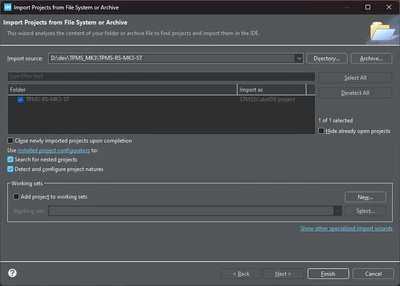
oga_0-1762364046453.png

but when I clic finish it never show in workspace 
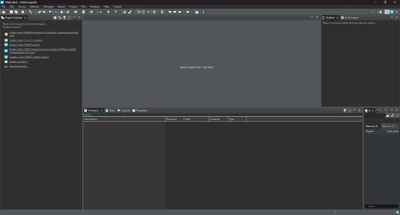
oga_2-1762364115904.png

here my information using 1.19 release of cube ide on a windows 11 host 
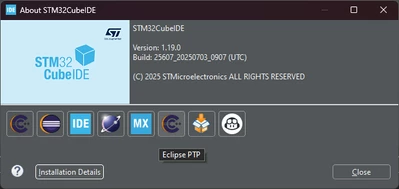
oga_1-1762364100608.png


Best answer by Mahmoud Ben Romdhane

Hello @oga ,


Let me thank you for posting.

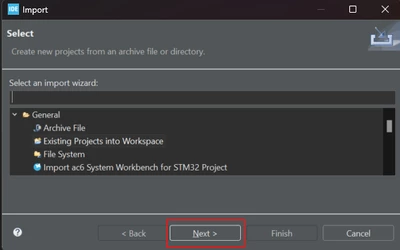
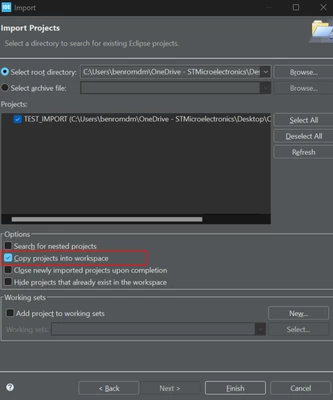
You need to click on Import , Next. Then enable [Copy projects into workspace].

MahmoudBenRomdhane_0-1762418662289.png

MahmoudBenRomdhane_1-1762418795451.png


Thanks.

Mahmoud


1 reply

Technical Moderator
November 6, 2025

Hello @oga ,


Let me thank you for posting.

You need to click on Import , Next. Then enable [Copy projects into workspace].

MahmoudBenRomdhane_0-1762418662289.png

MahmoudBenRomdhane_1-1762418795451.png


Thanks.

Mahmoud


To give better visibility on the answered topics, please click on Accept as Solution on the reply which solved your issue or answered your question.