
Include path in c++ Cube IDE
Hello,
I am converting from Arduino to STM 32 Cube IDE. Here I have a Problem with include paths:
What I want:
- Develop Libraries in a special folder
- Add the libraries as a LINK to the Cube IDE
- use #include command to include the library into the project
What I have done:
- I made a new Project "Blinky" in the cube IDE - done
- I selected a nucleo board in the cube IDE - done
- I programmed a hello world blinky using HAL without libraries - done.
So the environment and the board is running.
- right clicking on the project I created a new source folder "MyLibs"
By drag and drop I copied my library called "After" folder into the new MyLibs folder. Answered the message by "copy link only" into the new folder "MyLibs"
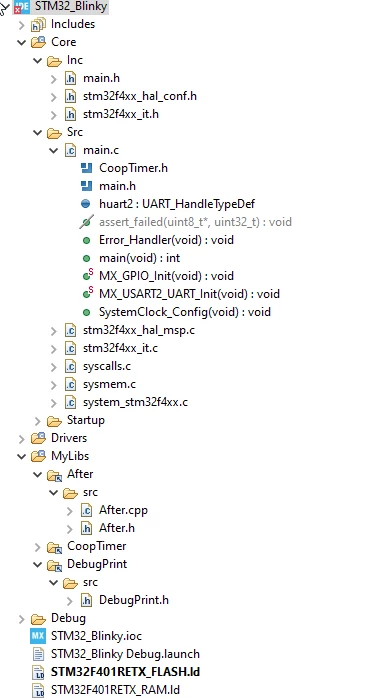
The copied folder "After" contains an other folder "src" where the source files are located. Here a picture of the project:
Now I go to properties and set the include path to the directory /MyLibs/After/src/:
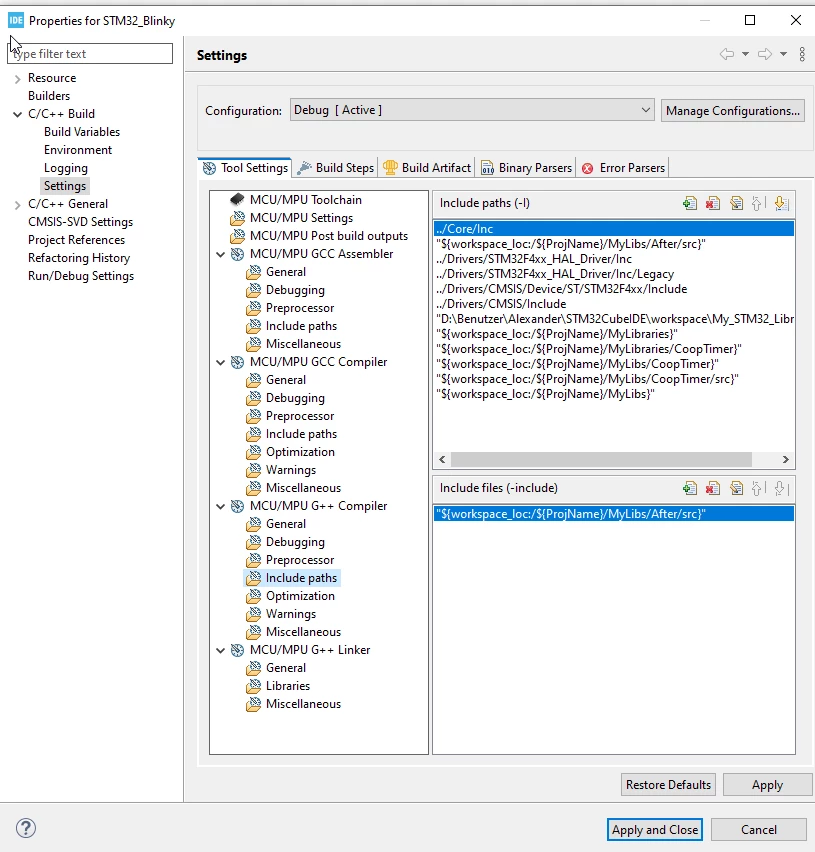
The second line indicates that I have included the directory successfully.
When comiling I get the error message:
<command-line>: fatal error: D:/Benutzer/Alexander/STM32CubeIDE/workspace/My_STM32_Libraries/After/src: No such file or directory
compilation terminated.
So it seems the files are not found.
Questions:
1. what is my mistake?
2. Is there a possibility that everything I put into /workspace/Mylibs/.... is automatically included to the search path or do I need to manually include all paths?
Thank you in advance
Alexander