
Issue flashing Ux_Device_Video example on STM32N6570-DK (project not entering main)
Hello,
I am working with the STM32N6570-DK board and using STM32CubeIDE (version 1.19.0) .
I cloned the full STM32N6 repository from: https://github.com/STMicroelectronics/STM32CubeN6
When I try to build and flash the Ux_Device_Video project, I face a problem:
I right-click on the Ux_Device_Video→ Debug As → it flashes successfully, but the program never reaches main(). (Normally in every program the debugger points to first line in main).
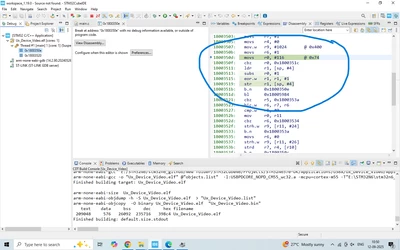
When I press Run, the debugger only executes a few assembly lines like below and stays there:
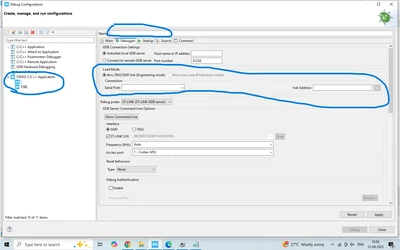
What I observed in Debug Configurations (screenshot attached):
For all other example projects, the Debugger tab looks normal , and in this project even FSBL flashing good and stops at main and behaves as expected.
But for Ux_Device_Video, I see an additional “Load Mode” section (highlighted in my screenshot). Other projects don’t have this.
Also, under STM32 C/C++ Application, I normally see two entries (e.g. FSBL and the application). But here I only see FSBL, not Ux_Device_Video.
The top “Name” field in Debug Config is also empty, unlike other projects.
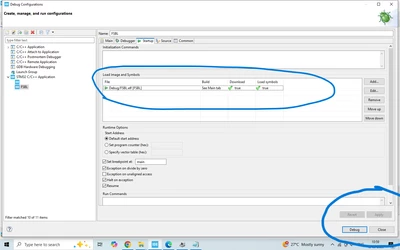
I tried to modify the debug configuration manually to match working examples, but this project does not accept the changes.
bellow image is FSBL project configuration , i tried to add the same for the ux_device_video but there is no options( Apply or debug ) are enabled for change .
How can I fix this so that the code actually enters main() and runs properly?
Any help or guidance on how to correctly debug and run this project would be greatly appreciated.
Thanks in advance.