

DPiór.1
Associate III
January 14, 2026
Solved

issue with semihosting after updating CubeIDE

  • January 14, 2026
  • 2 replies
  • 244 views

I updated CubeIDE to 2.0.0 (now CubeMX is separated) on MacOS. I started new project and want to set semihosting for debug. I did the configuration as I used to do in previous projects, but now when I try to run, I receive following error:

Info : [STM32WB5MMGHx.cpu] Cortex-M4 r0p1 processor detected
Info : [STM32WB5MMGHx.cpu] target has 6 breakpoints, 4 watchpoints
Info : [STM32WB5MMGHx.cpu] Examination succeed
Info : starting gdb server for STM32WB5MMGHx.cpu on 3333
Info : Listening on port 3333 for gdb connections
semihosting is enabled
semihosting fileio is enabled
Error: The 'gdb_report_data_abort' command must be used before 'init'.

Below my configuration of OpenOCD:
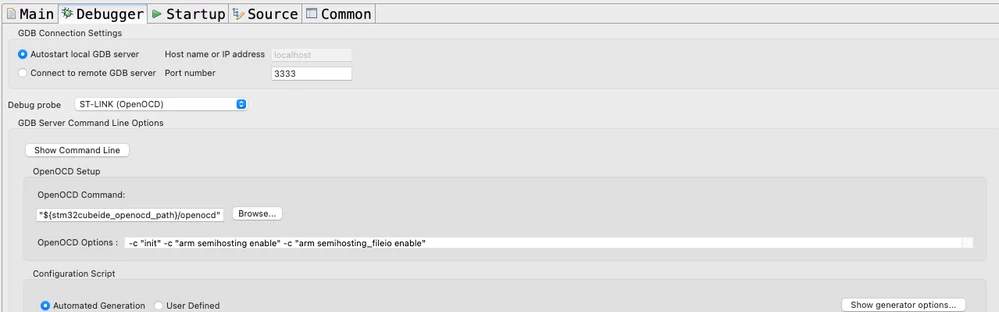
Screenshot 2026-01-14 at 07.40.28.png


Where should I put the gdb_report_data_abort command? 


Best answer by Mahmoud Ben Romdhane

Hello @DPiór.1 

Let me thank you for posting.

I suggest that you take a look at this Knowledge Article

It mentions how to use semihosting with STM32CubeIDE and STM32.

Thanks

Mahmoud

2 replies

Technical Moderator
January 14, 2026

Hello @DPiór.1 

Let me thank you for posting.

I suggest that you take a look at this Knowledge Article

It mentions how to use semihosting with STM32CubeIDE and STM32.

Thanks

Mahmoud

To give better visibility on the answered topics, please click on Accept as Solution on the reply which solved your issue or answered your question.
DPiór.1
DPiór.1Author
Associate III
January 14, 2026

Thanks @Mahmoud Ben Romdhane 
I already read this article before. But this time I read it carefully, doing everything exactly as in the article and removing any configuration that I used to have in the past. And it works! 
The only additional change that I had to do in my case, was to change reset mode to "software system reset".