

bramble
Senior
January 8, 2025
Solved

Missing GPIO pin defs after migrating from F4 to H7 dual-core

  • January 8, 2025
  • 3 replies
  • 742 views

Hi,

I have a project that was started on STM32F439 which I'm now migrating to STM32H755.

In my original project I had a number of GPIO assignments for which the code generator was creating definitions in main.h, such as below:


#define LCD_RST_Pin GPIO_PIN_2
#define LCD_RST_GPIO_Port GPIOF


In the above example I've assigned user label LCD_RST to the pin.

Following the same approach on the H7, for the C7 .ioc file I've similarly made my GPIO assignments, however I can't find any generated code relating to them. In this case main.h is much shorter, lacking any #defines relating to GPIOs. I've searched also for the GPIO pin name (such as PB2) but the only instances I can find are in the ioc file.

Any advice would be much appreciated, my ioc is attached.

Thanks in advance.
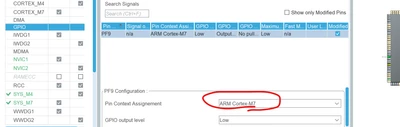
Best answer by TDK

You need to assign them to a core in the GPIO tab. Once you do that, they'll appear in the initialization code for that core.

TDK_0-1736301955056.png


3 replies

TDK
TDKBest answer
Super User
January 8, 2025

You need to assign them to a core in the GPIO tab. Once you do that, they'll appear in the initialization code for that core.

TDK_0-1736301955056.png


"If you feel a post has answered your question, please click ""Accept as Solution""."
bramble
brambleAuthor
Senior
January 8, 2025

Many thanks, that's very helpful.

Given that I was configuring the GPIOs in the C7's ioc file it seems strange that I also need to select the core assignment there. Is this to allow a GPIO to be potentially used from either core, with the user then responsible for writing the required GPIO initialisation code, and basically generating the code that MX creates when the assignment is not "free"?

TDK
Super User
January 8, 2025

The IOC file you attached controls both cores, doesn't it? It does when I load it. I don't think there is a separate one per core.

"If you feel a post has answered your question, please click ""Accept as Solution""."
bramble
brambleAuthor
Senior
January 8, 2025

Ah, yes of course you are right. Sorry that was a silly mistake on my part!

Thanks again for your advice.