
Associate
February 21, 2025
Solved

My board can no longer run the program I uploaded to it earlier

  • February 21, 2025
  • 7 replies
  • 2329 views

Hi,

Here's the thing. The program is supposed to change the speed of the blinking of the user green led when you click on the blue button. I made it a week ago, tested it and all was going well. However I dropped the board this morning, four pins (2 from CN12 and 2 others from CN11) were a bit twisted but I managed to put them back (wasn't a big of a deal). I checked if there were any missing components but there weren't any. I wanted to make sure nothing was wrong so I connected the board to my computer to see (the last uploaded program to the board is the one I mentioned earlier). I was surprised by the fact that the green led was not even blinking (it is supposed to, since when powered the last uploaded program in the flash memory is supposed to be ran). So I uploaded the same program to the board again, the led was blinking but if i disconnect the board from my computer and plug it again, the led's no longer blinking. It stops blinking as well if i click on the reset button (black button on the right of the blue one). Therefore I've deduced from it that the board no longer boots from the main flash  memory since the led is no longer blinking. I've looked up things like boot0 in the reference manual, I wanted to check if the pin was set to 0 but couldn't do so. I've found out about STM32CubeProgrammer a bit earlier, I used it and everything seemed fine. In the option bytes menu, nBOOT1 was checked, meaning that the board would boot from flash memory if BOOT0 = 0. This means if the BOOT0 pin is connected to ground, however before I dropped the board, there was no "jumper" connecting it to the GND pin. 
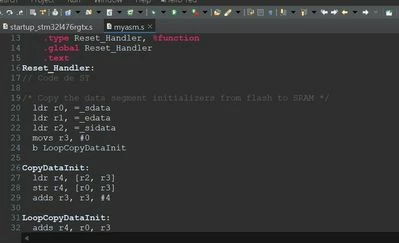
Best answer by HeroNthn

I found the solution. Some of lines (%function etc) you see here were removed. That's why things weren't working. Thank you all !

Capture d’écran 2025-04-15 120415.jpg

7 replies

TDK
Super User
February 21, 2025

You could really present the issue with more clarity. Hard to answer these "X doesn't work, help" posts in a manner that is useful to the asker.

  • What is the program supposed to do?
  • What does "not working" mean here? 
  • Does the board ever work? In what cases?
  • Can you connect over STM32CubeProgrammer?
"If you feel a post has answered your question, please click ""Accept as Solution""."
HeroNthnAuthor
Associate
February 21, 2025

Here's the thing. The program is supposed to change the speed of the blinking of the user green led when you click on the blue button. I made it a week ago, tested it and all was going well. However I dropped the board this morning, four pins (2 from CN12 and 2 others from CN11) were a bit twisted but I managed to put them back (wasn't a big of a deal). I checked if there were any missing components but there weren't any. I wanted to make sure nothing was wrong so I connected the board to my computer to see (the last uploaded program to the board is the one I mentioned earlier). I was surprised by the fact that the green led was not even blinking (it is supposed to, since when powered the last uploaded program in the flash memory is supposed to be ran). So I uploaded the same program to the board again, the led was blinking but if i disconnect the board from my computer and plug it again, the led's no longer blinking. It stops blinking as well if i click on the reset button (black button on the right of the blue one). Therefore I've deduced from it that the board no longer boots from the main flash  memory since the led is no longer blinking. I've looked up things like boot0 in the reference manual, I wanted to check if the pin was set to 0 but couldn't do so. I've found out about STM32CubeProgrammer a bit earlier, I used it and everything seemed fine. In the option bytes menu, nBOOT1 was checked, meaning that the board would boot from flash memory if BOOT0 = 0. This means if the BOOT0 pin is connected to ground, however before I dropped the board, there was no "jumper" connecting it to the GND pin. I'll make my posts more explicit next time, I apologize for not being clear earlier.

TDK
Super User
February 21, 2025

Thank you for the explanation.

There are a few ways to figure out if the cpu is in the bootloader or flash memory. Here is one of them:

In STM32CubeProgrammer, connect over SWD, then go to the CPU tab (on left) and note the value of the PC register. If the code is executing from flash, it will be 0x08xxxxxx. If it's in the bootloader, it will be 0x1FFFxxxx. I suspect it's booting from user flash. (Note that once you connect, the core will stop executing whatever it's doing but the registers will retain their values).

If it's booting from flash, but your program is not running, it's likely an issue with the various clocks not stabilizing during startup. You can change your program to use the internal LSI clock and not use HSE or LSE to see if this resolves the issue. Otherwise, you can debug the program (in STM32CubeIDE) and see which clock is causing issues and go from there.

"If you feel a post has answered your question, please click ""Accept as Solution""."
HeroNthnAuthor
Associate
February 21, 2025

The code is executing from flash since PC's value starts with 0x08. However I'm not sure I can have a view of the clocks while in debug mode. I could only open the .ioc file and check the clock configuration tab I can't modify anything in here.

AScha.3
Super User
February 21, 2025

Hi,

>My board

is - which board ? and cpu ?

"If you feel a post has answered your question, please click ""Accept as Solution""."
HeroNthnAuthor
Associate
February 22, 2025

It is the Nucleo-L476RG (Nucleo-64), cpu is STM32L476RG

AScha.3
Super User
February 22, 2025

And > there was no "jumper" connecting it to the GND pin < : and now ?

so check: is boot0 at gnd ?

AScha3_0-1740249266649.png

or just: put a jumper on cn7 , 7--8 , to have boot0 at gnd level.

It is with r33 to gnd , but maybe you damaged it and now its floating...

AScha3_1-1740249437580.png

so:

- jumper cn7 , 7--8 .

- set cpu to use internal HSI

- set HSE unused, disable.

- check nrst is hi .

Then try flash...etc.

"If you feel a post has answered your question, please click ""Accept as Solution""."
HeroNthnAuthor
Associate
February 22, 2025

Now that you mention it, I think I've damaged it...

Code is being ru n from flash memory but the previously uploaded program can not be run.


I have no extra jumpers, what I did was taking CN12's jumper and put it on CN7, 7--8, but things didnt work out.

And I wondered if I wouldn't mess things up by removing CN12's jumper. Also, I'm sorry but I'm not quite at ease with  clocks, I tried to modify them as @TDK suggested but the .ioc file won't let me touch them.

HeroNthnAuthor
Associate
February 22, 2025

The board can connect st-link and I can us the debug mode but do you mean by "the board can connect flash" ?

Also I've disabled LSE and HSE and put CN12's jumper on CN7, 7--8, but it's still not working...

I clicked on the reset button and the led was no longer blinking.

AScha.3
Super User
February 22, 2025

>by "the board can connect flash" ?

->connect st-link, flash, debug = for debug, program is flashed, from st-link. So all is working.

Maybe your program is doing something strange...

So check with STM32CubeProgrammer , what is set in option bytes , set to "normal" (default settings) , make full chip erase. Then load the program to flash (to the correct address!) and check its start address .

Maybe you set it to other address, than the "standard" start of a program, then cpu will not start it, because at the "start" address is no program...this might work in debug, because the debug starting the program, wherever it is. This could explain: program running on debug, but no more after reset. On some cpus you can even set a custom start address - i dont know L476 can do this , or not. So just check settings and read in rm.

"If you feel a post has answered your question, please click ""Accept as Solution""."
HeroNthnAuthor
Associate
February 23, 2025

I did what you said, erased CPU memory then uploaded the program again. In debug mode and through disassembly, the program seems to be running from flash according to the adresses. But yeah... whenever I click on reset, no more blinking.... Thanks for your help, I'll ask my teacher once I'm back to school. I'll let you know if I find a solution.

HeroNthn_0-1740328828690.png


TDK
Super User
February 22, 2025

Run your program in STM32CubeIDE in debug mode and see what it's doing. This a very normal part of programming. You don't have to guess what's going on.

It's probably just a code bug.

"If you feel a post has answered your question, please click ""Accept as Solution""."
HeroNthnAuthor
Associate
February 23, 2025

I just used debug mode, program ran perfectly and did what i was expecting however I'm still facing the same issue, i.e. once I click on reset, no more blinking.

TDK
Super User
February 23, 2025

Modify your debug configuration not to reset or flash the chip with these two options:

TDK_0-1740331047148.png

and

TDK_1-1740331070994.png


Then, run your program until it gets into the stuck state, then attach the debugger. You'll be able to debug the current position of the code.

"If you feel a post has answered your question, please click ""Accept as Solution""."
TDK
Super User
April 15, 2025

Yes, deleting code at random tends to break things. Would be good to have a version control to detect these sorts of things.

"If you feel a post has answered your question, please click ""Accept as Solution""."