

NUCLEO-H7S3L8 - Project with 3 sub-projects - but no "build all"? - Solved
Hello, I have configured a project with CubeMX using a NUCLEO-H7S3L8 with an STM32H7S3L8 MCU.
Although everything works, I first need to flash the bootloader and then flash the application.
A reset is required to start the app.
Using the debugger, I confirmed that the app is running from an external flash drive (PC with a 0x9000000 value).
I'm missing the "Build All" option, which allows you to build all three projects simultaneously and start the application after flashing without having to press the reset button. I think so.
This is the first time I've used a bootflash MCU, and I'm sure I've missed something.
I've attached the IOC file, which only shows a blinking yellow LED.
Why do I need to reset the board to start the application?
Update 1:
There's a "Build All" button in the toolbar that performs this task. But it does this for all projects in the workspace.
I usually have several projects in one workspace, so I don't need to re-adjust my entire workspace, such as the dark theme, colors, fonts, etc. That's not always handy, especially not when refactoring variable names.
Update 2:
Regarding the need to press the reset button to launch the app, I've fixed that as well.
In the app's debug configuration, on the "Startup" tab, I had to add the bootloader.
Make sure they are in the correct order to avoid a hardfault when starting debugging, like shown below.
For the application it should look like this:
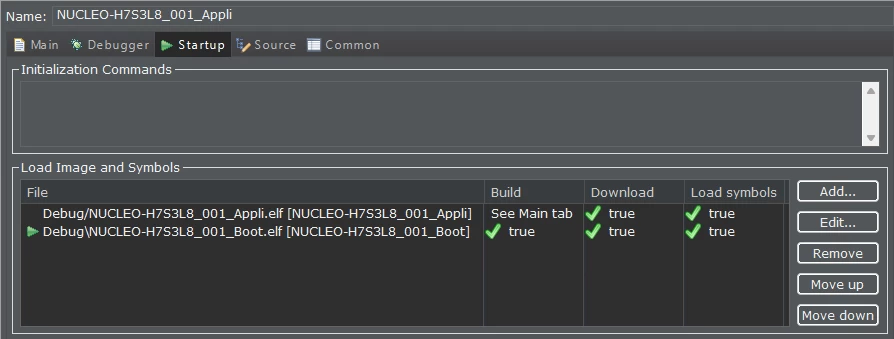
And for the bootloader it should look like this:
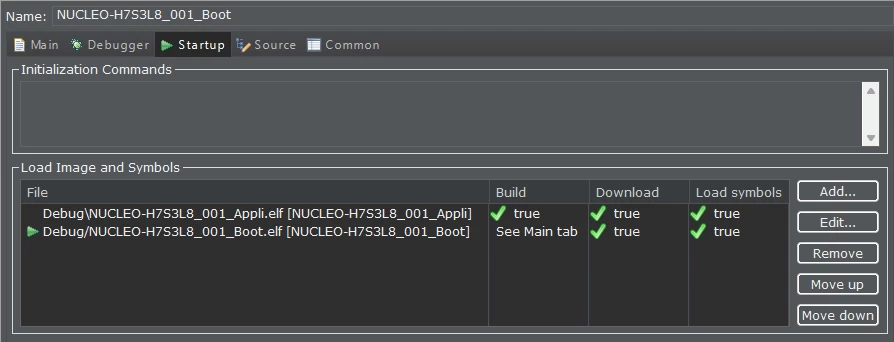
That was all folks, cheers, and happy debugging!
Solved.