

Andrew Neil
Super User
March 28, 2025
Solved

Override Breakpoint at 'main' ?
  • March 28, 2025
  • 2 replies
  • 1034 views
 

AndrewNeil_1-1743163673370.png

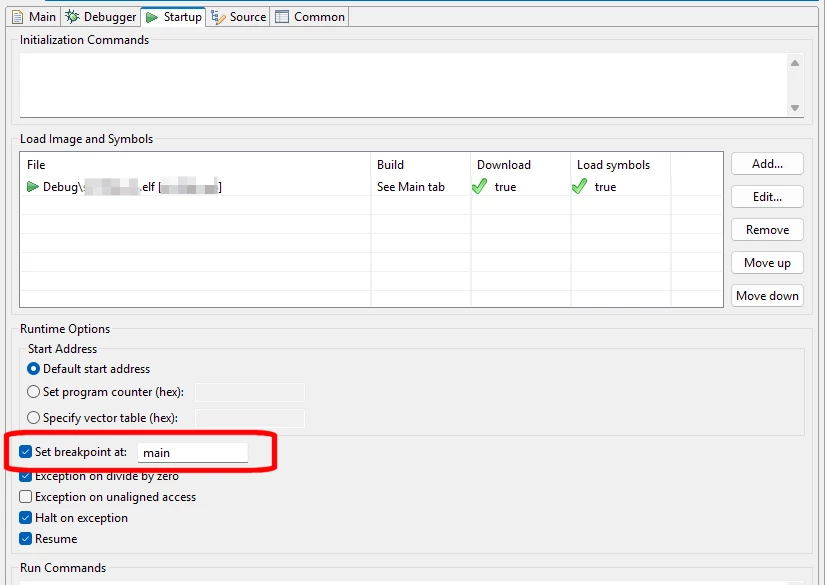
Is there a way to have this breakpoint only enabled at the start of the debug session?

So, when the code is first loaded, it will stop at main(); but then after subsequent resets I set my own breakpoint.

It doesn't appear in the list of breakpoints, so I can't clear/disable it from there.


Best answer by Pavel A.

Uncheck "set breakpoint at main". Then in the editor set a breakpoint on main and change its type to temporary (in Breakpoint properties). Then start debugging. The program will still break once at the reset handler, resume automatically then break on main.  Next resets won't break at main or reset handler. 


2 replies

TDK
Super User
March 28, 2025

I don't think so.

You can set "conditional" breakpoints in code which may achieve a similar result. Check if the debugger is connected, then check whatever flags you want (maybe a flag in RCC->CSR), and execute __BKPT();.

"If you feel a post has answered your question, please click ""Accept as Solution""."
Pavel A.
Pavel A.Best answer
Super User
March 31, 2025

Uncheck "set breakpoint at main". Then in the editor set a breakpoint on main and change its type to temporary (in Breakpoint properties). Then start debugging. The program will still break once at the reset handler, resume automatically then break on main.  Next resets won't break at main or reset handler. 


Andrew Neil
Super User
March 31, 2025

Thanks - that seems useful.


So what, exactly, is a "temporary" breakpoint?

It seems that it's applied only once in a debug session, but is retained between debug sessions.

Help is no help:

AndrewNeil_0-1743428479620.png


A complex system that works is invariably found to have evolved from a simple system that worked.A complex system designed from scratch never works and cannot be patched up to make it work.
Pavel A.
Super User
March 31, 2025

A temporary breakpoint is a breakpoint automatically removed after stopping on it.

It seems that Eclipse has two "modes" of displaying breakpoints. In the editor perspective you can set breakpoints and assign their properties. The Breakpoints view will show all the breakpoints in source files of the project.

When debugger starts, the Breakpoints view of Debug perspective  shows the runtime state of the breakpoints. I'm not sure about internals, looks like it starts from the initial breakpoint specified in the debug settings. If none is specified it breaks on the reset handler. When stopped at this initial breakpoint, it tries to set the breakpoints from the project files. If the "resume" is checked, it then automatically runs.

After this, temporary breakpoints are automatically removed from the Breakpoints view, even though you can still see them in the editor.  Eclipse is complicated ((