Streamer
Associate II
August 31, 2025
Question

Problem in Release Mode

  • August 31, 2025
  • 2 replies
  • 592 views

I am using the STM32F302R8Tx microcontroller. I usually work in debug mode. One day, I decided to use release mode and faced a problem. I looked for a solution and then tried several methods sequentially.

1)I had tried optimizasyon

2)include my driver layer

I didn't get result.  Can you help for this problem?
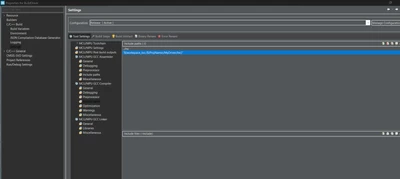
Streamer_0-1756640446618.png

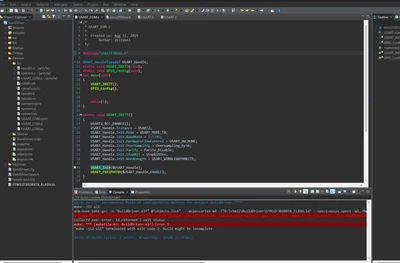
Streamer_1-1756640544902.png

I didn’t get any false evaluation in Debug mode

D:/Work/PLM/ST/STM32CubeIDE_1.19.0/STM32CubeIDE/plugins/com.st.stm32cube.ide.mcu.externaltools.gnu-tools-for-stm32.13.3.rel1.win32_1.0.0.202411081344/tools/bin/../lib/gcc/arm-none-eabi/13.3.1/../../../../arm-none-eabi/bin/ld.exe: cannot find D:stm32BuildDriverMyDriverInc: No such file or directory

collect2.exe: error: ld returned 1 exit status

make: *** [makefile:63: BuildDriver.elf] Error 1


2 replies

Radosław
Associate II
August 31, 2025

Mydriver  folder isn't marked as souce folder. 

Notice this folder icon looks different to SRC folder


Project setting -> C/C++ general -> Path and symbols  -> goto Source folder tab  add your folder

AScha.3
Super User
August 31, 2025

Simple solution: dont use "release mode" !


Detailed ...: "debug" and "release" are just names for two group of settings; 

- you can set same settings in both, then no difference - and useless to use both;

- you can set different settings, maybe have different optimizer setting, etc. , but then you get different code.

So up to user (you) , to use it not at all, or if you do: know, what you doing and why.

Why i never use it : i want to be 100% sure, the program i make and debug is exactly whats running then permanently .

"If you feel a post has answered your question, please click ""Accept as Solution""."
Radosław
Associate II
August 31, 2025

@AScha.3 wrote:

Simple solution: dont use "release mode" !


Detailed ...: "debug" and "release" are just names for two group of settings; 

- you can set same settings in both, then no difference - and useless to use both;

- you can set different settings, maybe have different optimizer setting, etc. , but then you get different code.

So up to user (you) , to use it not at all, or if you do: know, what you doing and why.

Why i never use it : i want to be 100% sure, the program i make and debug is exactly whats running then permanently .


This is vary bad advice.  Debug and release have different purposes, very importat for proper software development. 


AScha.3
Super User
August 31, 2025

@Radosław 

>This is vary bad advice.  Debug and release have different purposes, very importat for proper software development. 

So please explain: what different settings you use and why is it useful for "proper" software development. 

"If you feel a post has answered your question, please click ""Accept as Solution""."