
Associate III
January 22, 2026
Solved

RE: How to change the Repository directory (location)?

  • January 22, 2026
  • 2 replies
  • 290 views

A while ago I auto updated to 2.0.0. Prior to that, I was able to change the repository location. The instructions were nicely noted here:


https://community.st.com/t5/stm32cubeide-mcus/how-to-change-the-repository-directory-location/m-p/114938


Now with 2.0.0, the Firmware Updater option is missing from from Windows -> Preferences:
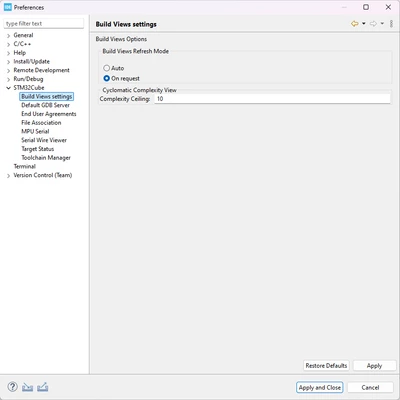
 

CCoder_0-1769098998082.png


I don't see anything listed in the release notes document found here:


https://www.st.com/resource/en/release_note/rn0114-stm32cubeide-release-v200-stmicroelectronics.pdf


Has this functionality been completely removed and we're now forced to have our repository in our User account folder on Windows?


FWIW, I also don't see a way of changing it in CubeMX.


Thanks,


C-Coder
Best answer by TDK

STM32CubeIDE doesn't include STM32CubeMX anymore so the option will not be in there.

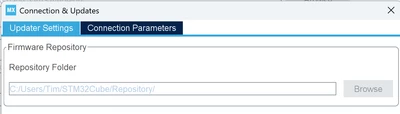
The option within STM32CubeMX is located here, under Help -> Connections & Updates:

TDK_0-1769099810780.png

(It is editable when a project is not open.)

2 replies

TDK
TDKBest answer
Super User
January 22, 2026

STM32CubeIDE doesn't include STM32CubeMX anymore so the option will not be in there.

The option within STM32CubeMX is located here, under Help -> Connections & Updates:

TDK_0-1769099810780.png

(It is editable when a project is not open.)

"If you feel a post has answered your question, please click ""Accept as Solution""."
C-CoderAuthor
Associate III
January 22, 2026

I'll stand corrected in that there is a way of changing it via MX. Thank you for correcting me. But can ST PLEASE update documentation for things like this? I realize that the Release Notes document says that MX was detached from the IDE integration, however it does not say anything about removing the Firmware Updater option from Preferences.


Thanks,


C-Coder