
Associate III
June 19, 2025
Solved

SFRs are not shown in the STM32CubeIDE in Debug mode

  • June 19, 2025
  • 1 reply
  • 337 views

Hello,

STM32F411CE microcontroller.
I created a starter project via STM32CubeMX using HAL and opened it in STM32CubeIDE. When I run this project in debug mode, the SFRs tab is empty (see figure bellow). Why?
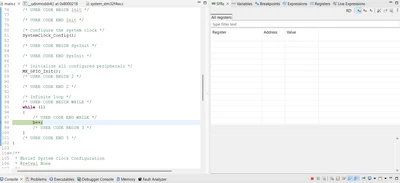
Mykola_Levun_0-1750324035376.png
When I create a project without using STM32CubeMX and, accordingly, without using HAL, the SFRs tab shows the registers and value of registers.
Best answer by Mykola_Levun

Hello @Ghofrane GSOURI ,

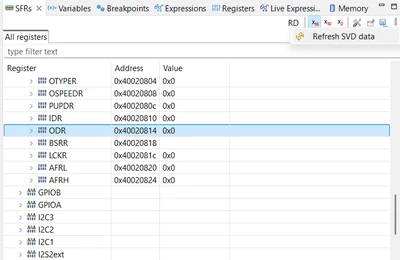
The problem was solved. It was necessary to click the Refresh SVD data button in the SFRs tab (see figure bellow).
Refresh SVD data button locates in the SFRs tab:
    1. Navigate to SFRs tab;
    2. Click on the 3 dots icon in the SFRs tab;
    3. Click Refresh SVD data.
After that, the registers and their values ​​appeared in the SFRs tab.

Mykola_Levun_0-1750337710637.png


1 reply

Ghofrane GSOURI
Technical Moderator
June 19, 2025

Hello @Mykola_Levun 

First let me thank you for reporting.

Could you please provide more details about the STM32CubeIDE and CubeMX version that you are using , also your OS.

THX

Ghofrane

To give better visibility on the answered topics, please click on Accept as Solution on the reply which solved your issue or answered your question.
Mykola_LevunAuthorBest answer
Associate III
June 19, 2025

Hello @Ghofrane GSOURI ,

The problem was solved. It was necessary to click the Refresh SVD data button in the SFRs tab (see figure bellow).
Refresh SVD data button locates in the SFRs tab:
    1. Navigate to SFRs tab;
    2. Click on the 3 dots icon in the SFRs tab;
    3. Click Refresh SVD data.
After that, the registers and their values ​​appeared in the SFRs tab.

Mykola_Levun_0-1750337710637.png