
Associate
October 14, 2024
Solved

Starting an STM32 Project in STM32CubeIDE

  • October 14, 2024
  • 1 reply
  • 1573 views

Hello everyone, 

I am new to STM32CubeIDE, I'm following this tutorial

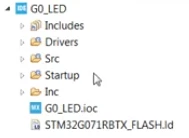
In the tutorial, he pressed okay to a message saying "generate new code?"

When he does, his project explorer showed this
AmaniAlzahrani_0-1728892597483.png

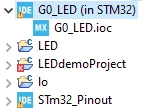
I followed same steps, and when I pressed okay to "generate new code?" message, nothing appeared, only the ioc file. (I'm working on G0_LED project)
AmaniAlzahrani_1-1728892667329.png


can you assist on what might went wrong and how I can fix this issue?


    Best answer by Mahmoud Ben Romdhane

    Hello @AmaniAlzahrani ,

    If your machine is connected to the internet via a proxy, you need to set the correct connection parameters

    [Host ; Port] to establish the link to the server.

    In this case, you should set the Active Provider to manual, otherwise you can work with the Direct option.

    Thanks.

    Mahmoud


    1 reply

    Technical Moderator
    October 14, 2024

    Hello @AmaniAlzahrani  ,

    First let me thank you for posting and welcome to the ST Community.

    Before generation the code, you should set the Internet Connection, log to your ST Account and install the firmware package.

    I suggest that you take a look at this Post.

    Thanks.

    Mahmoud.

    To give better visibility on the answered topics, please click on Accept as Solution on the reply which solved your issue or answered your question.
    Associate
    October 15, 2024

    Hi, Mahmoud Ben Romdhane,

    Thank you for responding

    I am following these steps in the provided post

    There is a step that says: "Update the proxy entries for HTTP and HTTPS with specific HOST, Port, User, and Password using the [Edit...] button"

    I do not understand what the HOST, Port, User, and Password should be.

    AmaniAlzahrani_1-1728973936563.png

    Also, at a later step, when I opened the provided website to download the software package, I didn't know which to download.

    This is what is shown to me:

    AmaniAlzahrani_0-1728973758475.png

    I appreciate all your help and support


    Technical Moderator
    October 15, 2024

    Hello @AmaniAlzahrani ,

    I advise you to set the Active Provider: Direct under:

    Window->Preferences->Network Connection

    MahmoudBenRomdhane_0-1728982986655.png

    Then check the Connection under:                                                           

    Window->Preferences->Firmware Updater->Check Connection

    MahmoudBenRomdhane_1-1728983274782.png

    Then log to your ST Account

    MahmoudBenRomdhane_2-1728983446224.png

    After the IOC configuration, click on Generate Code [CTRL¨+S] and the firmware will be successfully downloaded.

    Thanks.

    Mahmoud

    To give better visibility on the answered topics, please click on Accept as Solution on the reply which solved your issue or answered your question.