Associate III
July 7, 2025
Solved

stm32 targeted project type is empty and its not generating .ioc file
  • July 7, 2025
  • 20 replies
  • 15292 views

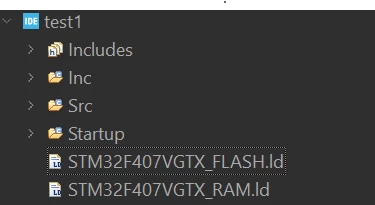
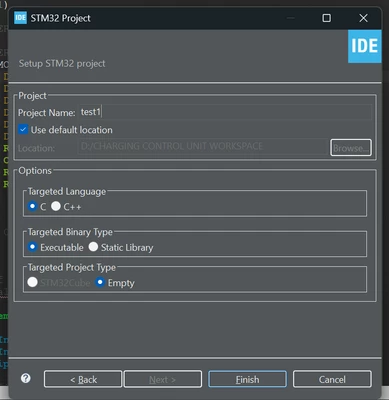
_kalpesh_0-1751889721909.png_kalpesh_1-1751889757616.png


#include <stdint.h>

#if !defined(__SOFT_FP__) && defined(__ARM_FP)
 #warning "FPU is not initialized, but the project is compiling for an FPU. Please initialize the FPU before use."
#endif

int main(void)
{
 /* Loop forever */
	for(;;);
}

Hi Im trying to generate new project with CUBE IDE 1.13 which was working fine this morning but somehow its not generating .ioc file anymore when i searched it says FPU not initialized & generates only files which are present in the second picture
plz help me on this

Best answer by Souhaib MAZHOUD

To resolve this problem, you should update your STM32CubeIDE to the latest version 1.19.0, which is available under this link.

20 replies

Associate II
July 8, 2025

Is ST now forcing us to update in order to create a new STM32 project?

Visitor II
July 9, 2025

Mine is still not working. I upgraded to v 1.19 and also updated the CubeMX also. No luck. I'm on a mac.

FB__1
Associate III
July 9, 2025

Same problem v1.19 did not solve the problem on Linux...
Is there a way to clean everything related to the stm32cubeide with apt remove ?

Technical Moderator
July 11, 2025

Could you please try the steps below that should resolve the problem:

- Close STM32CubeIDE
- Delete all those files from your PC: .stm32cufinder, .stm32cubemx, .stm32cubeide and .stm32cube
- Restart the STM32CubeIDE

To give better visibility on the answered topics, please click on Accept as Solution on the reply which solved your issue or answered your question.
Visitor II
July 9, 2025

I was able to get v1.19 to work on my Mac. I went to CubeIDE--> Help and updated everything as much as possible till there was nothing else to update. I have only tested making a new project. I haven't dared open older projects for fear of corrupting them. 

_kalpeshAuthor
Associate III
July 9, 2025

just make a copy of those projects in the different directory 
and import them in the 1.19 version

_kalpesh_0-1752038272673.png


and be mindful of the pop up which asks,
"Do you want to migrate the ioc file to the latest version"

if you chose yes you wont be able to open it in the older IDE versions, its safe to say NO and open with older MX  versions.

Visitor II
July 9, 2025

Hi,

I also have same issue, I am using v1.16 and today when i was creating a new project the option STM32Cube project is disabled, and only empty project is created. how this issue comes automatically or any updates done to older version also?

Visitor II
July 10, 2025

更新到1.19.0就可以创建了.可是为什么意法半导体要强制用户更新:pouting_face::pouting_face::pouting_face::pouting_face:

Visitor II
July 10, 2025

If you have an existing project for the processor you're using, copy that, rename the project in the cproject, project and .ioc files, and strip out what you don't need. That's what I'm going to have to do. I have older projects that I am still supporting with production code, and I can't afford to break the ide with an update. My long term solution is to build a toolchain that is not STM32CubeIDE - maybe VS code?

I don't really have the time or resources to dig that far into this, but it seems I don't have a choice.

Thanks ST

_kalpeshAuthor
Associate III
July 11, 2025

sir what i would suggest is,

create a new workspace with your current IDE version where you directly copy your current projects and import them directly.
the way you are suggesting is quiet messy, i have tried it few days ago it didn't work for me 
can you give some details about this if its working for you?
thanks! 

Andrew Neil
Super User
July 15, 2025

@_kalpesh wrote:

its not generating .ioc file anymore 


Same issue here with v1.18.1:

https://community.st.com/t5/stm32cubeide-mcus/cubeide-18-1-does-not-create-cubemx-project/td-p/822289

A complex system that works is invariably found to have evolved from a simple system that worked.A complex system designed from scratch never works and cannot be patched up to make it work.
WGoeb.1
Associate
July 15, 2025

Facing the same issue (using CubeIde V14, with my company's IT policy it's difficult to install new software versions frequently, anyway have to support software projects with older version).

2 weeks ago creation of a new project was still working well, facing this issue from today.

Is there really no other answer from ST to fix this than "install newest version"??

Graduate
July 16, 2025

Same here.

Really no other answers?


Andrew Neil
Super User
July 16, 2025

ST are, apparently, looking into it internally...

A complex system that works is invariably found to have evolved from a simple system that worked.A complex system designed from scratch never works and cannot be patched up to make it work.
WGend.15
Associate II
July 22, 2025

It's probably already been said, but one way around this is to use the standalone CubeMX tool to generate the .ioc. Then in STM32CubeProgrammer, you select the option: STM32 Project from an Existing STM32CubeMX Configuration File (.ioc).

WGend15_0-1753191764528.png


Amel NASRI
Technical Moderator
July 23, 2025

Hello All,

Please note that a permanent fix for the issue with STM32CubeIDE project creation is available.

You can refer to the thread [Resolved] STM32CubeIDE project creation issue for more details

-Amel

To give better visibility on the answered topics, please click on Accept as Solution on the reply which solved your issue or answered your question.