
snacker
Associate
February 3, 2024
Solved

STM32cube ide Hangs opening document in Software Packs Component Selector

  • February 3, 2024
  • 4 replies
  • 4607 views

When I view the information panel after selecting the "X-CUBE-BLE2" -> "Device BLE2_Applications" -> "Application" -> "SensorDemoBLE..." and clicking on the "Documentation: STMicroelectronics X-CUBE-BLE2_GettingStarted..." link, the "Software Packs Component Selector" popup window hangs and cannot be closed.  The document is never displayed. 

From what I can tell, it is attempting to load "/home/me/STM32Cube/Repository/Packs/STMicroelectronics/X-CUBE-BLE2/3.3.0/Documentation/STMicroelectronics.X-CUBE-BLE2_GettingStarted.pdf". 

I ran the IDE software updates via the "Help" menu yesterday, so I assume it is the latest version.  The command line shows it is running "/opt/st/stm32cubeide_1.12.0//plugins/com.st.stm32cube.ide.jre.linux64_3.1.0.202310310920/jre/bin/java" with "-Dosgi.instance.area.default=@user.home/STM32CubeIDE/workspace_1.14.1 -Declipse.buildId=Version 1.14.1"

The "Help" -> "About" shows:

Version: 1.14.1
Build: 20064_20240111_1413 (UTC)

There were other non-java processes running which seemed related using the path "/home/me/.stm32cubeide/.jxbrowser-7.35.1/Chromium/chromium".  I terminated them, but the popup window is still not responding.

It appears the java AWT Event thread is hung.  The stack trace is:

"AWT-EventQueue-0" #78 prio=6 os_prio=0 cpu=72358.73ms elapsed=88480.05s tid=0x00007fa7606a6a40 nid=0xee82 runnable  [0x00007fa7da5ed000]
   java.lang.Thread.State: RUNNABLE
at sun.awt.X11.XDesktopPeer.gnome_url_show(java.desktop@17.0.8.1/Native Method)
at sun.awt.X11.XDesktopPeer.launch(java.desktop@17.0.8.1/XDesktopPeer.java:119)
at sun.awt.X11.XDesktopPeer.browse(java.desktop@17.0.8.1/XDesktopPeer.java:108)
at java.awt.Desktop.browse(java.desktop@17.0.8.1/Desktop.java:533)
at com.st.microxplorer.plugins.thirdparty.gui.view.DetailsWarningPanel$CustomLinkModelAction.actionPerformed(DetailsWarningPanel.java:135)
at javax.swing.AbstractButton.fireActionPerformed(java.desktop@17.0.8.1/AbstractButton.java:1972)
at org.jdesktop.swingx.JXHyperlink.fireActionPerformed(JXHyperlink.java:266)
...
at java.awt.EventDispatchThread.pumpEvents(java.desktop@17.0.8.1/EventDispatchThread.java:109)

at java.awt.EventDispatchThread.pumpEvents(java.desktop@17.0.8.1/EventDispatchThread.java:101)
at java.awt.EventDispatchThread.run(java.desktop@17.0.8.1/EventDispatchThread.java:90)

I have included the full thread dump in the attached "stack.txt"

In addition to this hanging, in the "STM32Cube IDE" in the "Information Center" window, on the RHS there are links for "Support & Community", "Standalone STM32 Tools", and "Application Tools".  Clicking on any of those does nothing.  I assumed it would open the default browser or perhaps in a new tab in the IDE, but nothing happens.

Similarly, clicking on the "STM32 videos" opens the video thumbnails in a new page, but again, nothing happens when clicking on a video.

I can open the file in the OS default application in java via jshell by doing:

$ jshell
jshell> java.awt.Desktop dt = java.awt.Desktop.getDesktop();
jshell> var uri = new java.net.URI( "file:///home/me/STM32Cube/Repository/Packs/STMicroelectronics/X-CUBE-BLE2/3.3.0/Documentation/STMicroelectronics.X-CUBE-BLE2_GettingStarted.pdf" );
jshell> dt.browse( uri );

So, the functionality is there, but I'm using jshell of java version:

openjdk version "17.0.9" 2023-10-17
OpenJDK Runtime Environment (build 17.0.9+9-Ubuntu-122.04)
OpenJDK 64-Bit Server VM (build 17.0.9+9-Ubuntu-122.04, mixed mode, sharing)

I am running on "Ubuntu 22.04.3 LTS"


Best answer by snacker

@Oskar_H 

I think I've fixed the issue with the "Information Center" links not working.
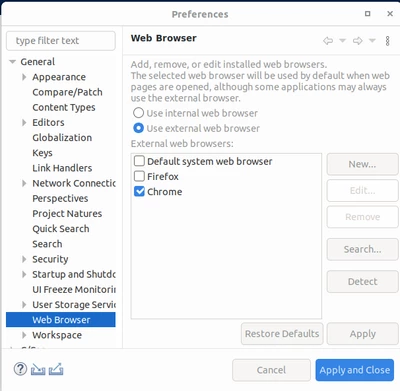
I went to "Window" -> "Preferences" -> "General" -> "Web Browser" and changed it to "Use Internal web browser" and selected "Chrome", then clicked "Apply and Close".

Testing further it seems that "Firefox" and "Default system web browser" does not work, but "Chrome" does whether or not "Use internal web browser" or "Use external web browser" is selected.

snacker_0-1706984012503.png


4 replies

Senior
February 3, 2024

Hello @snacker ,

almost same issues here on Ubuntu 23.10, a lot of links in STM32CubeIDE 1.14.0 are just doing nothing when clicked:

menu Help > Video Tutorials

Information Center > STM32CubeIDE resource portal on wiki

Information Center > STM32 videos > any video...

Information Center > STM32 MPU wiki

Information Center > STM32 MCU wiki

Information Center > STM32Cube github

Information Center > Support & Community > any link...

Information Center > Standalone STM32 Tools > any link...

Information Center > ST Application Tools > any link...

Information Center > Data collection information notice

==> ALL of these are just "click and wait forever while nothing happens" things !


About the X-CUBE-BLE2 documentation issue, I have a different behavior: when I click on any link from "Documents" section, it gets opened by either a text editor or a pdf viewer (as you can see in the apps menu bar on the left) but their respective contents are always hidden behind the "Software Packs Component Selector" window ! Then I just cannot read anything until I close this window or reduce its size... but no hang so far.

STM32CubeIDE_PacksSelector.png

Too bad these tools are full of awful design faults like that one, which impact a lot the user experience and let think that Ubuntu support is not truely tested...

snacker
snackerAuthorBest answer
Associate
February 3, 2024

@Oskar_H 

I think I've fixed the issue with the "Information Center" links not working.
I went to "Window" -> "Preferences" -> "General" -> "Web Browser" and changed it to "Use Internal web browser" and selected "Chrome", then clicked "Apply and Close".

Testing further it seems that "Firefox" and "Default system web browser" does not work, but "Chrome" does whether or not "Use internal web browser" or "Use external web browser" is selected.

snacker_0-1706984012503.png


snacker
snackerAuthor
Associate
February 3, 2024

This also fixes the hanging issue I originally posted.

Senior
February 4, 2024

Helo @snacker ,

thanks for your advice but I have tried all combinations of Web Browser settings in Preferences > General and none of them work.

Note that I don't have Chrome installed on my system, only Firefox... But I expect it to be launched when choosing "Use external web browser" and either "Default system web browser" or "Firefox" !

STM32CubeIDE_Preferences.png

I did not find any recommendation in STM32CubeIDE User Guide about these settings.

ST should definetely fix this !!

snacker
snackerAuthor
Associate
February 11, 2024

@Oskar_H , I did some more research on this.  It appears that it (eclipse in general) only works with older versions of Firefox.  You might want to try to install Chrome and see if that works (with Chrome selected in the settings).

rclar.6
Associate III
January 13, 2026

Why does this keep breaking. It seems everytime you go back to stm32cubeide after a poor shutdown or because its tuseday or whatever, it makes you play the .lock and kill java games.

rclar.6
Associate III
January 13, 2026

Could we have a 'reset locks' button?