
Senior III
March 11, 2025
Solved

STM32CubeIDE 1.18.0 live expressions stopped working completely

  • March 11, 2025
  • 1 reply
  • 1443 views

Before the STM32CubeIDE had serious issues with the live expressions during debug, with variables showing random values and signs when they were unsigned (the issues are various years old now https://community.st.com/t5/stm32cubeide-mcus/stm32cubeide-1-18-0-released/m-p/778624#M34678)


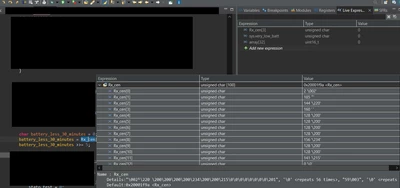
After updating to STM32CubeIDE Version: 1.18.0 Build: 24413_20250227_1633 (UTC) the live expressions completely broke


All the variables now show 0 and they won't vary


As you can see from the screenshot, hovering while on breakpoint shows the correct value. On the top right, all the values are 0 in the live expressions tab
nico23_0-1741693357205.png

That's pretty bad considering, trying to migrate to VSCode for being able to debug, gives another sort of issue, acknowledge by ST itself https://community.st.com/t5/stm32-vscode-extension-mcus/stm32-vs-code-extension-no-compiler-found-in-cache-file/m-p/781619#M640


What happened to this company lately...? All these bugs had been unusual back in '19/'20


Best answer by nico23

The issue seemed to be the GDB server.

Switching to OpenOCD has made the live viewer during debug work correctly

THIS IS NOT THE SOLUTION, CHECK LATEST POST FOR WORKAROUND https://community.st.com/t5/stm32cubeide-mcus/stm32cubeide-1-18-0-live-expressions-stopped-working-completely/m-p/834696/highlight/true#M38371

1 reply

Technical Moderator
March 13, 2025

Hello
Could you please provide additional information (MCU, OS version) in order to further investigate the issue?

KR,

Souhaib

To give better visibility on the answered topics, please click on Accept as Solution on the reply which solved your issue or answered your question.
nico23Author
Senior III
March 13, 2025

I'm using Windows 10 22H2, 10.0.19045 Build 19045 on the STM32F091VB

Technical Moderator
March 14, 2025

Hello @nico23 

I am unable to reproduce the issue on my side. Could you try these suggestions below and check if the issue persists?
- Update the firmware version of ST-Link.

- Disable optimization during debugging by compiling with -OO

- Debug with OpenOCD if you are using a GDB server.


To give better visibility on the answered topics, please click on Accept as Solution on the reply which solved your issue or answered your question.