
Associate
September 16, 2025
Question

STM32CubeIDE Debug Launch Stuck at 51% (Affects Multiple Boards, Multiple Users)
  • September 16, 2025
  • 8 replies
  • 1064 views

Screenshot 2025-09-15 143546.png

Dear STMicroelectronics Support Team,

I am writing to report a persistent issue with STM32CubeIDE that is affecting multiple users in our company and blocking our development work.

Issue Description:

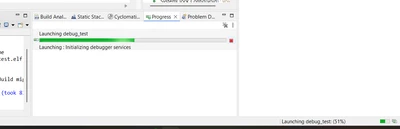
When we try to debug any STM32 project, the debugger launch process gets stuck at 51% with the message:

Launching: Initializing debugger services

The issue occurs with different versions of STM32CubeIDE and with multiple target boards.

Steps to Reproduce:

Open STM32CubeIDE and build the project (build succeeds).

Click Debug.

Debugger launch stops at 51% and does not proceed further.

Environment Details:

STM32CubeIDE Versions Tested: 1.9.0 and 1.13.2 (same result)

Operating System: [Windows 10 / Windows 11]

Target Boards Tested:

STM32F429I-DISC1

STM32F407-DISC

ST-LINK Firmware: [if known, mention version]

Actions Taken:

Reinstalled STM32CubeIDE (both versions).

Reinstalled ST-LINK USB drivers.

Verified ST-LINK is detected correctly in Device Manager.

Tried on multiple PCs within our company — all systems show the same behavior.

Despite these actions, the issue persists on all systems and boards.

I have attached a screenshot of the IDE progress bar stuck at 51% for reference.
Could you please investigate this issue and suggest a solution or provide a patch/update if this is a known problem?

This issue is affecting multiple developers in our company, so an urgent resolution would be greatly appreciated.

8 replies

Technical Moderator
September 16, 2025

Hello @Durgaprasadvalleboina_2001 

Have you tried to test with the latest version of CubeIDE 1.19.0?

KR,

Souhaib

To give better visibility on the answered topics, please click on Accept as Solution on the reply which solved your issue or answered your question.
Associate
September 16, 2025

I tried both Versions STM32CubeIDE Versions Tested: 1.9.0 and 1.13.2 (same result)

Technical Moderator
September 16, 2025

Hello @Durgaprasadvalleboina_2001 

I recommend using the latest version of STM32CubeIDE V1.19.0. Otherwise, let's try these steps below:

  • Right click the project in the project explorer and select "Index -> Rebuild"
  • Make a clean build by right clicking the project and select "Clean Project", Then build the project again
  • If none of the two steps above helps, try making a new workspace and import the project to the new workspace and see if anything changes

KR,

Souhaib

To give better visibility on the answered topics, please click on Accept as Solution on the reply which solved your issue or answered your question.
Associate
September 18, 2025

Durgaprasadvalleboina_2001_0-1758171690003.png

I enabled "Log to file," but no file was generated because the debugger never starts (stuck at 51%). I tried with STM32CubeIDE v1.19.0, reinstalled IDE and drivers, created a new workspace, and tested on multiple PCs and boards — the issue persists everywhere. This looks like a possible STM32CubeIDE / ST-LINK toolchain issue, so please escalate it to your engineering team for further investigation.

Durgaprasadvalleboina_2001_0-1758170085780.png

Technical Moderator
September 24, 2025

Hello @Durgaprasadvalleboina_2001 

Can we proceed with these steps:

- Run STM32CubeIDE as administrator,
- Reduce optimization level to -O0
- Under Project>Properties>C/C++ Build>Behavior and uncheck the "Enable parallel build"

Otherwise, can you please attach the log file from STM32CubeIDE/Workspace/.metadata 

KR,

Souhaib

To give better visibility on the answered topics, please click on Accept as Solution on the reply which solved your issue or answered your question.
Associate
September 25, 2025

still, I am facing same issue my stm32cube-ide not working I uploaded my logfile below check that

Visitor II
September 18, 2025

Hi ST Team, 

I am also facing the same issue. I have tried all the above-mentioned steps still the issue persists.

Requesting you to please guide me on this. 

Regards,

Alister 

Associate
September 18, 2025

Durgaprasadvalleboina_2001_1-1758176546577.png


Associate II
December 12, 2025

@Souhaib MAZHOUD I have the same issue.  My project is for a NUCLEO-H7S3L8, using an external memory loader to load the application into external FLASH, and bootloader in internal flash.  Based off the ethernet projects here .  We have been programming and testing this code for months, and then all of a sudden I was unable to debug today.

One thought that may not have been addressed in this thread is that the port to talk to GDB may be blocked.  However, I don't see the `arm-none-eabi-gdb` executable running at all.  Or perhaps local antivirus software is preventing it from running?

Unfortunately, this means my project is dead in the water until we can resolve this.  Please escalate, if possible.


Here is a co-worker's build output, which is "good":

working.png

Here is MY build output that is "bad". I cannot get the "terminated with code -1" to go away:

broken.png

Pavel A.
Super User
December 14, 2025

Your build has not completed successfully, this is why debugging step won't start.

To understand why build fails, please remove temporary -j28 to run only one command at once. See which one fails.


Associate II
December 15, 2025

I disabled parallel build, but exit code -1 still occurs, see below. Any other ideas? I'm running STM32CubeIDE version 2.0.0.  Perhaps I'll go back to 1.18 or 1.16

rbtmkr42_0-1765810237882.png

rbtmkr42_1-1765810255293.png


TDK
Super User
December 16, 2025

It's odd that the ELF is generated but exit code -1 is reported. This could be a file system issue, maybe insufficient permissions on something it's trying to generate. Does the ELF and LIST file shown in the log exists on disk?

Windows may be objecting to using C:/Libraries as a project directory instead of something within user directory.

Try creating a workspace under C:\Users\%USERNAME%\Documents and generating the project there and building.

"If you feel a post has answered your question, please click ""Accept as Solution""."
Associate II
December 17, 2025

Very good ideas.  I tried creating an IOC and project in my user directories, but it's still doing the same thing. Here's a screenshot of the permissions for my user directory:

rbtmkr42_0-1765995588057.png


I tried a few times in different subdirectories of my user directory.  It's possible that it could be related to security protections on this PC.

TDK
Super User
December 17, 2025

> It's possible that it could be related to security protections on this PC.

Very possible as well. The debugger uses some ports for communication. If those are disallowed, it will fail.

If you only build the project, do you still get the same exit code -1 message? Doesn't seem like this is related to debugging to me.

"If you feel a post has answered your question, please click ""Accept as Solution""."
Pavel A.
Super User
December 16, 2025

Ah, so that is launch of the debugger, not of the IDE. 

As a quick workaround, disable automatic build on launch. Of course, verify that the project has been built successfully and the specified elf file exists.


PavelA_0-1765928766374.png


Associate II
December 17, 2025

Yes - that's right: launch of the debugger. I tried disabling the auto-build, after generating the ELF file. I also tried taking out some of the steps in the makefile such as "secondary-outputs". Still had the same result. I am likely going to migrate to a different PC soon, since this still isn't working.

TDK
Super User
December 18, 2025

This feels like a company-specific issue which is going to be difficult to debug externally.

Can you try it on a PC that isn't burdened by company security settings?

"If you feel a post has answered your question, please click ""Accept as Solution""."
Associate II
December 18, 2025

So I have at least 2 other laptops here (one on Windows and one on Linux) that have not had this issue with the same code repository.  I plan to move completely our project dev environment over to Linux going forward, since the build environment just really doesn't like Windows.  It's just frustrating that this computer was fine for about 18 months, and all of a sudden this started happening.  It doesn't make sense, and it was willed that way by the computer gods :laptop_computer::high_voltage::high_voltage::high_voltage:

Pavel A.
Super User
December 18, 2025

@rbtmkr42 Before moving to Linux (a good idea generally) consider this:

 - Ask your IT admin to temporary disable the "security" or "management" stuff

 - Try to install the Linux software on Windows under WSL.