
Associate III
December 15, 2025
Solved

Stm32CubeIDE Default Setting ?

  • December 15, 2025
  • 2 replies
  • 600 views

Is there an option in the STM32CubeIDE settings to reset to factory settings or something like “Default Settings”?

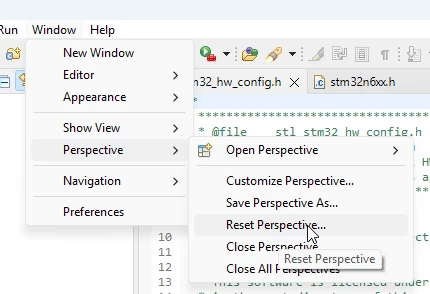
I can’t restore the console window to its original state. When I compile the code, the console window used to appear at the bottom, but now it doesn’t show up anymore.
Best answer by Christophe VRIGNAUD

Hello,

With the screenshot.

2025-12-15 18_24_18-workspace_1.19.0 - STM32CubeIDE.png

2 replies

mƎALLEm
Technical Moderator
December 15, 2025

Hello,

Try to activate it as the following:

mALLEm_0-1765787515201.png


"To give better visibility on the answered topics, please click on ""Accept as Solution"" on the reply which solved your issue or answered your question."
XooMAuthor
Associate III
December 15, 2025

I know how to reactivate the console. But it opens as a separate window. However, when I first installed STM32CubeIDE, it did not open as a separate window.

KnarfB
Super User
December 15, 2025

Window > Perspective > Reset Perspective

hth

KnarfB

Christophe VRIGNAUD
ST Employee
December 15, 2025

Hello,

With the screenshot.

2025-12-15 18_24_18-workspace_1.19.0 - STM32CubeIDE.png