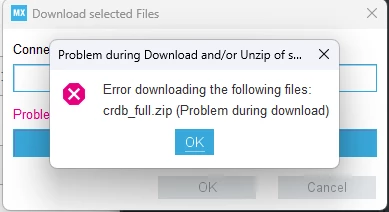
Hi, I have also been having this problem. I installed version 1.15.1 and I tried to create a new stm32 project and I got this exact error.Were you ever able to resolve it? I saw the same issue in some other threads, but none of those solutions worked.
Thank you so much! Earlier, I had tried using my phone's mobile hot spot like you suggested and it did not work. But, I tried again today, and it worked!
I think you have fixed the problem by now. But maybe someone who has the same problem will be interested.
I had a similar problem when I tried to install the SMT32G474 package. After I moved the folder for the firmware repository from my user directory to a general directory on the C disk, the problem no longer occurred. You can find the settings under: [Help/Connection & Updates] and the [Updater Settings] tab in the dialog. In the [Firmware Repository] section, I set the directory to C:\Local\Tools\STMicroelectronics\STM32Cube\Repository But all other generally accessible directories without spaces(?) should work. It was then possible to install the packages.
Windows now has symbolic links. So instead of moving stuff to C:\Local\Tools\STMicroelectronics\STM32Cube\Repository you can create a symlink to the "repository", that has a good name. Enter this name into CubeIDE or MX settings. Now you can access the "repository" by either name.
Well, Local\Tools\STMicroelectronics\STM32Cube would be real directories, and 'Repository' would be a symlink created in the latter directory.