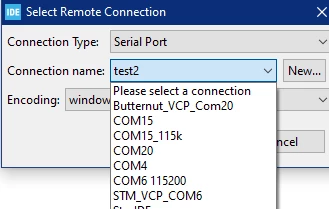
You will find:
- the most recent setting in: <workspace_xyz>\.metadata\.plugins\org.eclipse.remote.console\dialog_settings.xml
- all of the last of these settings in: <workspace_xyz>\.metadata\.plugins\org.eclipse.core.runtime\.settings\org.eclipse.remote.core.prefs
Just close Eclipse and delete in (2) the obsolete blocks (5 lines per block for Serial Port) using your favourite text editor.
Note: If you also change the name of one or more entries in (2), please do not forget that the name and port number of an entry here match the one from dialog_settings.xml (1).
<edit>Please note that dialog_settings.xml can contain special characters in the name, e.g. a comma.
However, org.eclipse.remote.core.prefs is not an XML file, so entries are stored in UML encoded format, which is why the comma is replaced by %2C.</edit>
Good luck!
If the problem is resolved, please mark this topic as answered by selecting Select as best. This will help other users find that answer faster.
/Peter