

CTabo.1
Senior
January 16, 2024
Solved

STM32CubeIDE upgrade

  • January 16, 2024
  • 3 replies
  • 3413 views

Hello, 
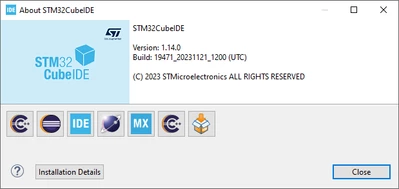
I have recently upgradated STM32CubeIDE from v.1.13.2 to v.1.14.0.

The upgrade seems has gone well, as indicated in the Help->About window:
CTabo1_1-1705396108646.png

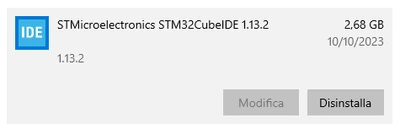
Anyway, if i check the window installed application list, is still indicated the previous version:
CTabo1_0-1705396031665.png

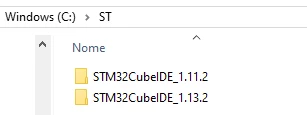
Also, in the file system I continue to see the old version 1.13.2, but not the new one 1.14.0.
CTabo1_0-1705396433143.png

This doesn't seem to be very clear and I am a little bit confused.
Is it better to disinstall a reinstall STM32CubeIDE?

Regards,
Carlo


    Best answer by Imen.D

    Hello @CTabo.1 

    It is possible to install new versions of STM32CubeIDE in parallel with older versions.

    I recommend you follow the steps in the "UM2563: STM32CubeIDE installation guide" to update an STM32CubeIDE installation.

    3 replies

    Imen.DBest answer
    Technical Moderator
    January 16, 2024

    Hello @CTabo.1 

    It is possible to install new versions of STM32CubeIDE in parallel with older versions.

    I recommend you follow the steps in the "UM2563: STM32CubeIDE installation guide" to update an STM32CubeIDE installation.

    "When your question is answered, please close this topic by clicking ""Accept as Solution"".ThanksImen"
    CTabo.1
    CTabo.1Author
    Senior
    January 18, 2024

    Thank you @Imen.D.

    Regards,
    Carlo

    TDK
    Super User
    January 16, 2024

    If the about screen says 1.14.0, I wouldn't worry about it. If on Windows, you can right click the icon and find the EXE that is running. It could be that it installed it within the v1.13.2 directory, but it could also have been placed in a local user folder.

    "If you feel a post has answered your question, please click ""Accept as Solution""."
    Visitor II
    September 24, 2025

    I recently upgraded STM32CubeIDE from v1.13.2 to v1.14.0 and noticed something similar — the Help → About window shows the correct updated version, but in the Windows application list and filesystem the old version (1.13.2) still appears. It can be a bit confusing.

    A clean uninstall and reinstall usually clears up these mismatches and ensures only the latest version remains.
    For anyone facing such upgrade or setup issues.