Garnett.Robert
Senior III
June 8, 2025
Question

Stm32CubeIDE V 1.18.1 will not import projects

  • June 8, 2025
  • 3 replies
  • 450 views

Hi


Recently STMCubeIDE started screwing up project imports created by CubeMX 6.14.1.

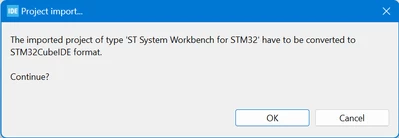
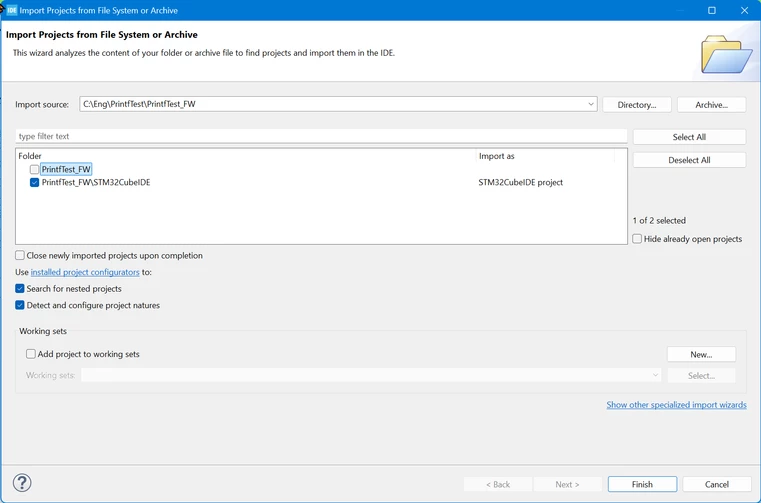
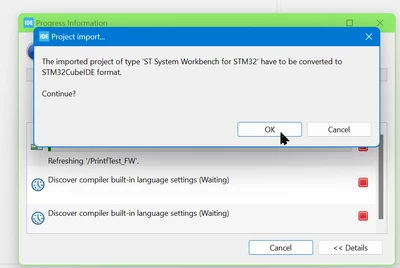
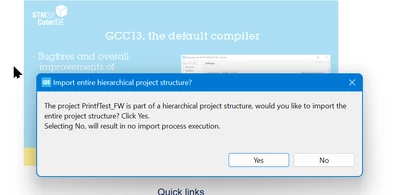
The project is created OK by CubeMX but when I open STM32CubeIDE it does the following:

Step 1
Snag_1be70690.png

Step 2

Snag_1be77884.png

Step 3

Snag_1be7a698.png


Step 4

Snag_1be7dd58.png

I have reinstalled both CubeMX and the IDE, but that hasn't fixed it.

I have no clue on what to do.

I am running both these Cube apps on my laptop and they work fine.

Please help!


3 replies

KnarfB
Super User
June 8, 2025

More details are needed to reproduce. Attach the .ioc file and specify the STMCubeIDE version.

hth

KnarfB

AScha.3
Super User
June 8, 2025

Hi,

you want import > project imports created by CubeMX , for stm32CubeIDE ,

but message shows: 

AScha3_0-1749367308519.png

...so you didnt generate for CubeIDE - why ?

see project settings in CubeMX :

AScha3_0-1749373587765.png

...and set stm32CubeIDE .

"If you feel a post has answered your question, please click ""Accept as Solution""."
TDK
Super User
June 8, 2025

Typically this happens if you have an IOC file where it shouldn't be. Look in all of the parent directories and ensure no IOC files or .project files are present.

"If you feel a post has answered your question, please click ""Accept as Solution""."
Garnett.Robert
Senior III
June 11, 2025

Thanks for that TDK I will have a look.  But it's odd exactly the same project, works on my laptop.