Associate II
October 28, 2024
Solved

STM32cudeIDE on Ubuntu 24.04 - no target

  • October 28, 2024
  • 5 replies
  • 3362 views

Hi guys

I need help! 

After the installation, I am trying to start a new project in the STM32CudeIDE, it requires a target no more opinions

How can I resolve this?
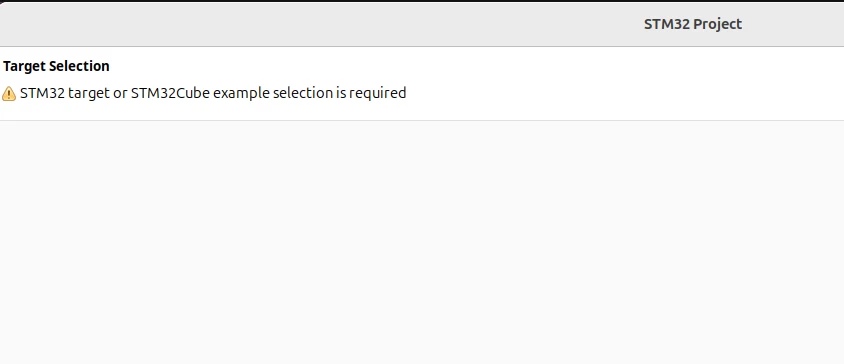
PrtscreenPrtscreen

Best answer by a-jorge

Hi,

I found a possible solution 

1- create the project in the STM32cudeMX

              Select the language and target broad, save the project

2- Open the STM32cudeIDE

           Search for the project that you created in the STM32cudeMX and be happy :)
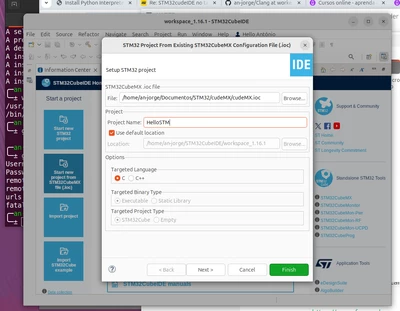
 

cudeIDE prtscrcudeIDE prtscr


5 replies

STTwo-32
Technical Moderator
October 28, 2024

Hello @a-jorge and welcome to the ST Community.

First, you have to go to File>New>STM32 Project. then you can start your project from a MPU/MCU, an evaluation board or an example. 

More details are provided on this Wiki 

Best Regards.

STTwo-32 

a-jorgeAuthor
Associate II
October 28, 2024

Hi,

Is that what I am doing ( File>New>STM32 Project), but the second screen with the list of target select is not snowing up.


I am using ubuntu 24.04

STTwo-32
Technical Moderator
October 28, 2024

Are you using the Last version of CubeIDE (V1.16.1).

Best Regards.

STTwo-32

debugging
Lead
October 28, 2024

Perhaps try

ulimit -n -H 4096

before starting CubeIDE.

The Eclipse bug seems to show itself in many different forms.

Running Ubuntu 24.10 myself and its fine.

a-jorgeAuthor
Associate II
October 28, 2024

Hello,

I didn't understand, how can I do it.

debugging
Lead
October 30, 2024

1. Open a command prompt in the folder where CubeIDE executable is located

2. Enter

     ulimit -n -H 4096 <enter>

3. enter 

    ./stm32cubeide <enter>

Do this every time you want to use CubeIDE

a-jorgeAuthor
Associate II
October 30, 2024

Hello,

Doesn't work 

It still jumping the select target screen as in the video.

https://drive.google.com/file/d/1Xh2KV1O5ukZZbHWqwPttRqMuMFU8aegH/view?usp=sharing


prompt prtscrprompt prtscr

debugging
Lead
December 7, 2024

I just upgraded the IDE to 1.7 and run fine on Ubuntu 24.10. I have another post. the only issue I have is that the IDE shows a warning for entries like __ALIGN_BEGIN static uint8_t USBD_CDC while it did not before version 1.16.1
