Associate
November 24, 2024
Solved

STM32L496G-Disco Pin Configuration question

  • November 24, 2024
  • 1 reply
  • 1262 views

Hello,

I am new to stm programming. I got a STM32L496G-DISCO board and I wanted to create a new project. When I try to configure the pins i have a lot of yellow triangle warning icons and some of the fields are purple which can not be changed. I don't know if that is normal or am I doing something wrong. I tried an simple UART code and it doesn't work. It keeps on shutting down automatically and this appears the second I compile "

Verifying ...

Download verified successfully

Shutting down...

Exit."
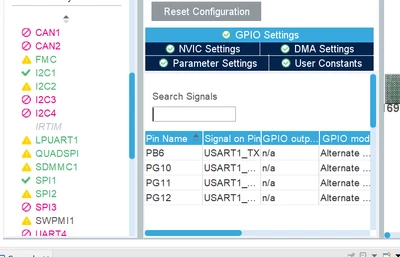
 

AndreeaP31_0-1732472011140.pngAndreeaP31_1-1732472076599.png


Best answer by mƎALLEm

Hello,

As I can see from your screenshots, you started the project from a board instead of the MCU part number and you selected to initialize all the available peripherals. Here no need to configure USART2 as it was already configured by CubeMx with "initialize all the peripherals" option.

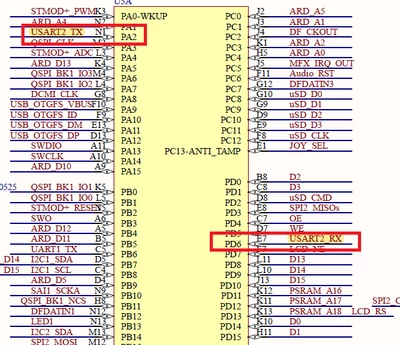
According to the board schematics: USART2_Tx: PA2 and USART2_Rx: PD6:

SofLit_0-1733150397895.png

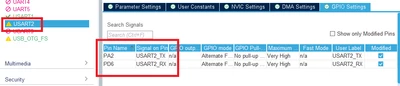
Which is confirmed with CubeMx:

SofLit_1-1733150472738.png

As USART2 is connected to the STLINK-Virtual comport, you can use STLINK as UART- to-USB bridge.

But you need to check all the UART parameters: baudrate, parity etc ..


1 reply

KnarfB
Super User
November 24, 2024

UART1 is connected to the STMOD+, USART2 is tunneled to the host via ST-LINK USB VCP, see board schematics, so USART2 should work.

On a DISCO board (in contrast to Nucleo) most pins are already routed on the PCB and thus have a dedicated purpose. Generally hover over the red/yellow marks and read the explanations. Cross check with the board schematics. Yellow means: not every config of that peripheral is possible because of pin conflicts, but at least one specific config is still possible. Red means: no config of a peripheral is possible because they all will generate pin conflicts. 

hth

KnarfB


Associate
December 2, 2024

Hi, sorry for replying so late, I coudn't test it till now. I have changed to USART2 and i keep having the exact same problem when I compile it "

 "

Verifying ...

Download verified successfully

Shutting down...

Exit."
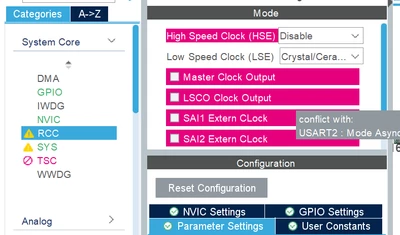
" and nothing on my PuTTy program. I only used this for the code "

while (1)

{

/* USER CODE END WHILE */

HAL_UART_Transmit(&huart2, tx_buffer, 27, 10);

HAL_Delay(1000);

/* USER CODE BEGIN 3 */

}

"and i declare tx_buffer as "uint8_t tx_buffer[27]="Welcome to BinaryUpdates!\n\r";". I also attached a photo with the configuration of USART2

AndreeaP31_0-1733149799926.pngAndreeaP31_1-1733149810404.png


mƎALLEm
mƎALLEmBest answer
Technical Moderator
December 2, 2024

Hello,

As I can see from your screenshots, you started the project from a board instead of the MCU part number and you selected to initialize all the available peripherals. Here no need to configure USART2 as it was already configured by CubeMx with "initialize all the peripherals" option.

According to the board schematics: USART2_Tx: PA2 and USART2_Rx: PD6:

SofLit_0-1733150397895.png

Which is confirmed with CubeMx:

SofLit_1-1733150472738.png

As USART2 is connected to the STLINK-Virtual comport, you can use STLINK as UART- to-USB bridge.

But you need to check all the UART parameters: baudrate, parity etc ..


"To give better visibility on the answered topics, please click on ""Accept as Solution"" on the reply which solved your issue or answered your question."