Associate II
December 2, 2025
Question

Unable to debug application running from external PSRAM

  • December 2, 2025
  • 1 reply
  • 675 views

Hello everyone.

In a couple of past days I was trying to make the code execution from external PSRAM to work. I managed to load the code into external FLASH and then copy it to PSRAM at boot stage. The code runs nice but can't debug it for some reason. Debugging worked when I was running the code directly from external FLASH but when I introduced copying the data to PSRAM and running it from there I started to get errors. It wont even let me Run the program if I dont exit the debugger.
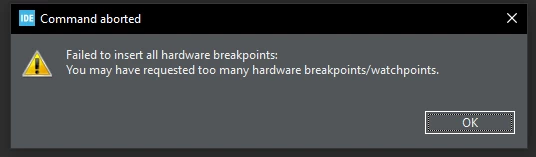
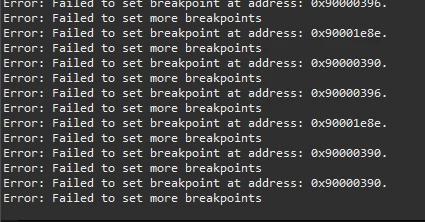
Snímka obrazovky 2025-12-02 172139.png

Snímka obrazovky 2025-12-02 172143.png

Snímka obrazovky 2025-12-02 201642.png

I don't understand how it can't access the memory despite the application running fine.


Edit: I found out that if I debug Boot project but add symbols from Application project too I can debug both fine.

1 reply

Technical Moderator
December 3, 2025

Hello @Kubis438 

Can you try to Delete all previous breakpoints, Inside CubeIDE: Window → Show View → Breakpoints → Remove All.

BR, Souhaib

To give better visibility on the answered topics, please click on Accept as Solution on the reply which solved your issue or answered your question.
Kubis438Author
Associate II
December 3, 2025

Thanks for suggestion but already tried that. It didn't help.

Technical Moderator
December 9, 2025

Hello @Kubis438 

I've noticed that you've made changes to the description.


@Kubis438 wrote:

Edit: I found out that if I debug Boot project but add symbols from Application project too I can debug both fine.


I assume that this is the root cause of your issue. It seems that the PSRAM was not initialized correctly, which led to the breakpoint error.

BR, Souhaib


To give better visibility on the answered topics, please click on Accept as Solution on the reply which solved your issue or answered your question.