
January 9, 2022
Question

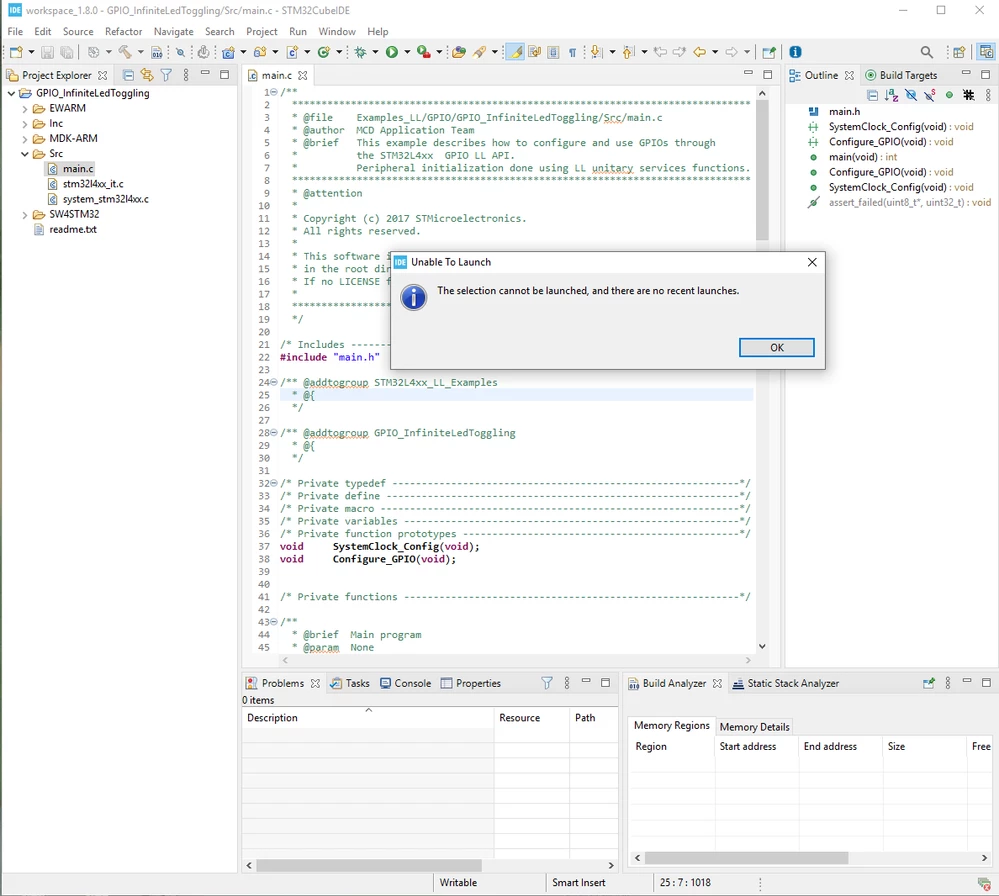
Unable to Launch The selection cannot be launched and there are no recent launches stm32cubeide

  • January 9, 2022
  • 8 replies
  • 24185 views

Using this tutorial I went to run GPIO_InfiniteLedToggling as my first example using STM32CubeIDE, but at stage 5 of that tut when it wants us to debug the project (F11), I get that Unable to Launch error:
0693W00000Hr0IYQAZ.png 

How to fix this issue, please?

8 replies

TDK
Super User
January 9, 2022

Loops like you may have imported it incorrectly.

If you open the .project file within the SW4STM32 folder and let STM32CubeIDE import the project, it should work.

"If you feel a post has answered your question, please click ""Accept as Solution""."
January 9, 2022

Do you mean the .project file in the following address?0693W00000Hr1h0QAB.pngAfter opening it with the IDE, this message appeared:

0693W00000Hr1hjQAB.pngI clicked Yes.

The another message:

0693W00000Hr1htQAB.pngAnd finally press F11 to debug.

0693W00000Hr1i3QAB.pngAbd as you can see, no change in the result!

Why do I get that message? :(

I tried much to do all what the STM tutorial says!

January 10, 2022

Isn't there any solution for the problem? Then how should I start working on STM boards. I've gone through the process using the IDE and tut which are both of STM. So one of them should be the source of the issue. Even what the instructions say doesn't match the screenshots provided (e.g., in part #5). so what can I do now?

TDK
Super User
January 10, 2022

That is the file I meant.

I double clicked on that file to open it and ran through these steps myself and had no issues opening the project and debugging.

Note that your cursor needs to be within a project file when you hit debug in order for it to know you want to debug that project.

You can also right click the project and hit Build to see if it can build correctly.

09:43:53 **** Build of configuration Debug for project STM32L476RG_NUCLEO ****
make -j12 all 
arm-none-eabi-gcc ...
...
 
arm-none-eabi-gcc -o "STM32L476RG_NUCLEO.elf" @"objects.list" -mcpu=cortex-m4 -T"../STM32L476RGTx_FLASH.ld" --specs=nosys.specs -Wl,-Map="STM32L476RG_NUCLEO.map" -Wl,--gc-sections -static --specs=nano.specs -mfpu=fpv4-sp-d16 -mfloat-abi=hard -mthumb -Wl,--start-group -lc -lm -Wl,--end-group
Finished building target: STM32L476RG_NUCLEO.elf
 
arm-none-eabi-size STM32L476RG_NUCLEO.elf 
arm-none-eabi-objdump -h -S STM32L476RG_NUCLEO.elf > "STM32L476RG_NUCLEO.list"
arm-none-eabi-objcopy -O binary STM32L476RG_NUCLEO.elf "STM32L476RG_NUCLEO.bin"
 text	 data	 bss	 dec	 hex	filename
 1080	 24	 1568	 2672	 a70	STM32L476RG_NUCLEO.elf
Finished building: default.size.stdout
Finished building: STM32L476RG_NUCLEO.list
 
Finished building: STM32L476RG_NUCLEO.bin


09:43:54 Build Finished. 0 errors, 0 warnings. (took 1s.344ms)

Make sure your IDE is up to date.

"If you feel a post has answered your question, please click ""Accept as Solution""."
January 10, 2022

My IDE is up to date. Yesterday I downloaded and installed it on my Windows machine.

At what address on you machine did you find and run your .project file, please? There're a couple ones I tested but all had the same issue!

I guess there must be a problem with the project, or the IDE doesn't recognize it as a complete project. I tried to attach my STM32F411RE board to the PC but this didn't give any success.

By the way there's no Build option on the pop-up menu when right-clicking the project name:

0693W00000Hr7kAQAR.png

January 11, 2022

I actually found the issue just by messing with the files, say, the .project file! That file exists in a little further directory in the address shown in the tutorial. That is, we need to go further to ...\GPIO_InfiniteLedToggling\SW4STM32\STM32F411-Nucleo on the Import Source. That way the project debugs, and runs successfully on the board as expected.

PS: That's really sad why ST company doesn't care about the contents offered in their tutorials especially when a starter is going to use them to begin learning embedded programming! :(

Visitor II
October 12, 2023

I have this problem too.I update my  ST_link driver and  solve it。

Associate III
April 5, 2025

Maybe that's not the solution,

but I tried to build the project a few times and after some attempts, the error disappeared