

MMich.2
Associate II
September 29, 2020
Solved

Unit tests in STM32CubeIDE

  • September 29, 2020
  • 5 replies
  • 18734 views

Currently I'm developing within the STM32CubeIDE for an STM32F373CC.

I use the main.c as entry point into a wrapper and program all of the rest in C++.

I generally try to keep any HAL code outside of simple classes that can be unit tested easily. Ideally my tests would still compile when data types and some definitions are used from the HW-related codes but I don't really need actual HW-code running within a test. I just want to test algorithms and basic classes. Any comments regarding the HAL or any other HW-related code would still be appreciated.

When adding a class to my project the IDE suggests adding a unit test:
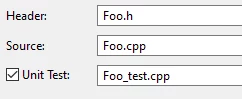
0693W000004I6ydQAC.png 

So how exactly is this supported? The Foo_test.cpp is simply added to my project but I'm not sure how to proceed. Do I have to integrate a unit testing framework on my own? Is there a framework somehow included in the STM32CubeIDE? Is there support for test execution and visualization?

Any resources and guides are appreciated! If non of this is supported, I'd still like to know why the UI shows this nice "Unit Test" checkbox for me ; - )

A similar question was asked here but hopefully I at least get an answer to why there is a checkbox present in the UI.

Best answer by mattias norlander

Hi MMich.2,

As @TDK​ said, there is no official unit test tool support in STM32CubeIDE. Nothing we have played much with, we leave this for the community to explore.

So in terms of recommended UT frameworks, there is a whole bunch of them, depends on your requirements. I think you will need to evaluate. Maybe someone has written a guide for unit testing on embedded devices and special considerations imposed by running on remote targets.

You could create specific project.

But the Eclipse way would probably be to rely on build configurations instead. This would allow you to have one build config to build your full production binary (typically called Release), one for debug purposes (typically called Debug). These two are default generated in a CubeIDE project. Create one or several extra build configs called UT_ComponentX, UT_ComponentY...

These build configs can use different include paths, defined symbols and even include/exclude extra folders with source code to be built. excluding/including different folders is useful to call an alternative main() function and our test runners...

The concept of build configuration is described in the User Guide which was recently released. Try this link. By no means 100% coverage of all use cases for build configs, but if you are new to Eclipse it could maybe be useful.

5 replies

TDK
Super User
September 29, 2020

> hopefully I at least get an answer to why there is a checkbox present in the UI.

STM32CubeIDE is built using Eclipse. The "Unit Test" checkbox, among many other things, is just inherited from that framework.

I don't think any unit testing framework is supported directly by STM32CubeIDE, although you could certainly implement your own with a bit of work. Depends what you need to test. Raw code is easy, code that interfaces with registers and hardware not so much.

"If you feel a post has answered your question, please click ""Accept as Solution""."
MMich.2
MMich.2Author
Associate II
September 30, 2020

Thanks, very interesting!

  • Do you have any suggestions on where to start to integrate let's say google test or any other light weight unit test library?
  • Would I create a dedicated project for this and reference the actual classes and code from my real project somehow? This is not so nice, I think since this project would have to reference code "outside" of its project directory, not sure.
  • Or should I add my *_test.cpp files simply to my project in a dedicated sub-folder? If so, how would I compile and execute those tests? I guess that I need a dedicated main.c that sets up the testing framework and actually runs the tests.

Sorry for those basic questions. I'm not used to Eclipse at all and looking for "best practices" to structure all of this. In my make-based projects I simply have a dedicated main that sets up google test. I have full control over the files that are compiled into the test project. In my Qt project I use QtCreator as IDE and I have a dedicated unit test project "within" my project so this is built separately and simply references all of the production code. I guess that this is more like the situation with the CubeIDE.

mattias norlander
ST Employee
October 2, 2020

Hi MMich.2,

As @TDK​ said, there is no official unit test tool support in STM32CubeIDE. Nothing we have played much with, we leave this for the community to explore.

So in terms of recommended UT frameworks, there is a whole bunch of them, depends on your requirements. I think you will need to evaluate. Maybe someone has written a guide for unit testing on embedded devices and special considerations imposed by running on remote targets.

You could create specific project.

But the Eclipse way would probably be to rely on build configurations instead. This would allow you to have one build config to build your full production binary (typically called Release), one for debug purposes (typically called Debug). These two are default generated in a CubeIDE project. Create one or several extra build configs called UT_ComponentX, UT_ComponentY...

These build configs can use different include paths, defined symbols and even include/exclude extra folders with source code to be built. excluding/including different folders is useful to call an alternative main() function and our test runners...

The concept of build configuration is described in the User Guide which was recently released. Try this link. By no means 100% coverage of all use cases for build configs, but if you are new to Eclipse it could maybe be useful.

MMich.2
MMich.2Author
Associate II
October 6, 2020

Thanks for the clarification and for describing the "Eclipse way" and for the link! Build configurations make a lot of sense!

Michael K
Senior III
July 31, 2022

I remember stumbling on this thread a year ago, and since then I've been working on a process that allows you to run GoogleTest unit tests against common, loosely-coupled code directly in CubeIDE.

Basically, you need to have to a local C/C++ compiler with POSIX support (e.g MSYS2 or Cygwin on Windows)​ already set up. Then in the same workspace as your STM32 project, create a local C/C++ "test template" project. Back in the STM32 project, create a new build configuration for the unit tests. There will be an option to copy settings from another project - select the debug config from the test template function. Then create directories for the GoogleTest source code, your unit tests, and your common application code, and import them into CubeIDE. Set up the include paths and source filters to compile the gtest_all and gmock_all files, and your unit test and common files. Create a test main, and run the configuration - the files and tests will compile and run on your native machine.

I created a step by step guide to setting up unit tests in STM32CubeIDE that describes the steps above in more detail.

Nikita91
Lead II
August 1, 2022

Thanks a lot.

It would be worth creating an entry for this in the project area. This would allow everyone to know and be able to benefit from it.

Pavel A.
Super User
August 1, 2022

Well if I understood correctly, M.K. does not run unit tests on the target. Rather, tests are built for the host PC, with a different compiler, possibly with different C++ flavor etc.

What he offers is factoring out common code and using Eclipse as common IDE for both projects + google test viewer add-on.

MDL
Visitor II
December 2, 2022

Agreed, and there is also an inherent danger from creating any type of test framework that excludes the target. These tests, which may run perfectly on non-target code and in a different compiler, can give a false sense of security. In the worst case encourage the release of completely untested target code. All testing, to have any chance of being effective, should be designed and run exclusively on target.

Associate II
October 21, 2024

I am transitioning from AVR to STM and am considering my options for TDD. I have been using TDD for well over a year now and I will never go back, so it is a must for me for any new project.

The way I have been working so far is:

  • any hardware related code is separated out into separate files/modules, i.e. in STM terms: any HAL_* functions
  • the main function hardly has any content, only e.g. initProject() and while(1) { runProject() }
  • all other code (>95% in my case) is strictly under TDD on a pc, I don't worry about TDD on target.

So far this has worked well for me on MPlab and even ArduinoIDE (only for prototyping). 

The nice side-effect of this approach is also that all platform-specific code is separated by design, so it should make my transition to STM relatively painless (famous last words... ?). Also you can work with any IDE/editor you like for 95% of the development work (I use Kate), without worrying about  hardware.

On STM/Cube I hope to use the same method, although the nature of its main.c is such that I have to recosider how I am dealing with the platform specific code. If I dump it all into main.c it will become too big for my taste, but that is still WIP.

By the way, I am using cpputest (for pure C code) and learned a lot from the abovementioned Grenning book and watching some uncle Bob videos on YT.

Sorry for rambling on, but I thought this might be useful for others going down the same path.