
Associate II
January 30, 2025
Question

Using -include file GCC option causes errors.

  • January 30, 2025
  • 4 replies
  • 4653 views

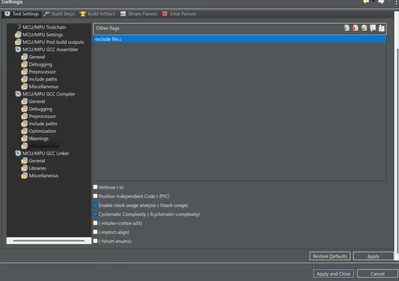
I have an STM32H743 project generated and i'd like to include an external file using the GCC "-include file" command option. I've added it as shown in this screenshot under C/C++ Build > settings > MCU/MPU GCC Compiler > Miscellaneous
BobaJFET_0-1738262058529.png

The problem is the compiler doesn't seem to find file.c, no matter where I place it within the project directory. I've tried placing inside the same folder as main.c with no success. 

Here's a good reference to where this option comes from. 

Preprocessor Options (Using the GNU Compiler Collection (GCC))

The error:

<command-line>: fatal error: file.c: No such file or directory
compilation terminated.


Update: I think i've figured out how to get it to know where the file is, by adding the path under C/C++ General > Paths and Symbols > Source Location. But I still have these make errors: 

make: *** [Drivers/STM32H7xx_HAL_Driver/Src/subdir.mk:88: Drivers/STM32H7xx_HAL_Driver/Src/stm32h7xx_hal.o] Error 1
make: *** [Drivers/STM32H7xx_HAL_Driver/Src/subdir.mk:88: Drivers/STM32H7xx_HAL_Driver/Src/stm32h7xx_hal_adc.o] Error 1
make: *** [Drivers/STM32H7xx_HAL_Driver/Src/subdir.mk:88: Drivers/STM32H7xx_HAL_Driver/Src/stm32h7xx_hal_adc_ex.o] Error 1
make: *** [Drivers/STM32H7xx_HAL_Driver/Src/subdir.mk:88: Drivers/STM32H7xx_HAL_Driver/Src/stm32h7xx_hal_cortex.o] Error 1
make: *** [Drivers/STM32H7xx_HAL_Driver/Src/subdir.mk:88: Drivers/STM32H7xx_HAL_Driver/Src/stm32h7xx_hal_dma.o] Error 1
make: *** [Drivers/STM32H7xx_HAL_Driver/Src/subdir.mk:88: Drivers/STM32H7xx_HAL_Driver/Src/stm32h7xx_hal_dma_ex.o] Error 1
make: *** [Drivers/STM32H7xx_HAL_Driver/Src/subdir.mk:88: Drivers/STM32H7xx_HAL_Driver/Src/stm32h7xx_hal_exti.o] Error 1
make: *** [Drivers/STM32H7xx_HAL_Driver/Src/subdir.mk:88: Drivers/STM32H7xx_HAL_Driver/Src/stm32h7xx_hal_flash.o] Error 1


I've used this -include option in other IDE's before with no problems but i'm a bit new to cubeIDE.


4 replies

TDK
Super User
January 30, 2025

Source files (*.c) shouldn't be included. They are not within the include path if you are using an inc/src folder structure.


Include folders should be listed here for the various compilers. I should have circled the "GCC Compiler" one instead of assembly.

TDK_0-1738262908421.png


Source folders should be listed here:

TDK_1-1738262942215.png

"If you feel a post has answered your question, please click ""Accept as Solution""."
BobaJFETAuthor
Associate II
January 30, 2025

What is the difference between a source folder and an include folder? 

Tesla DeLorean
Guru
January 30, 2025

>>What is the difference between a source folder and an include folder? 

In the broader sense it is so stuff that's shared among multiple projects isn't duplicated into each. Say math, stdio and string libraries.

An Include Path provides an ordered list about where to search for them

Tips, Buy me a coffee, or three.. PayPal VenmoUp vote any posts that you find helpful, it shows what's working..
AScha.3
Super User
January 30, 2025

So you want just add a file to a project ?

Then IDE should know this :

open your project (left pane) and right click on the project name : select : import.

then you see:

AScha3_0-1738262961782.png

then use > file system -> and set directory for import, then select .c or .h files and the folder, you want to have them.

Then IDE knows...if using include xx.h , what you want and will compile the c files imported also.

/* USER CODE BEGIN Includes */
#include <stdlib.h>
#include <string.h>
#include "math.h"
#include <stdio.h>
#include "ili9341.h"

here i include ... graphics driver for ili9341 .

"If you feel a post has answered your question, please click ""Accept as Solution""."
BobaJFETAuthor
Associate II
January 30, 2025

I'm aware that files can be included into compilation with a #include.  

I want to tell the compiler, or the IDE to "add" the #include files automatically without having to keep #includes in the source code. This is what the -include file gcc option normally does. 

Pavel A.
Super User
January 31, 2025

@BobaJFET Check your preprocessor include path. From the gcc docum: "the first directory searched for file is the preprocessor’s working directory instead of the directory containing the main source file. If not found there, it is searched for in the remainder of the #include "…" search chain as normal."


Andrew Neil
Super User
February 1, 2025

@BobaJFET wrote:

The problem is the compiler doesn't seem to find file.c,


That's because you've just given its name - the compiler also needs to know its location.

By using this option, you're treating file.c as an "header" (.h) file, rather than a normal source file - so have you tried putting it in the same folder as other header files which are found?

As others have said, #including .c files is generally considered poor practice - so why, exactly, do you want to do this?

Why not just add the .c file to the Project like all the other .c files.

A complex system that works is invariably found to have evolved from a simple system that worked.A complex system designed from scratch never works and cannot be patched up to make it work.