Associate
October 14, 2024
Solved

What is wrong with STM32 CubeIDE IOC editor?

  • October 14, 2024
  • 2 replies
  • 1321 views

Hello,

For some time the CubeIDE ioc editor looks like this:
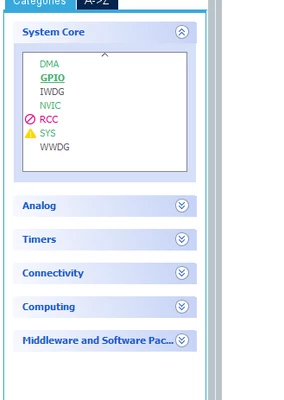
PanutaRoman_0-1728930582741.png

How can I fix it?

BR, Roman!

Best answer by STTwo-32

Could you try to unistall and re-instal the last version of the STM32CubeIDE. It may solve the issue.

Best Regards.

STTwo-32 

2 replies

STTwo-32
Technical Moderator
October 14, 2024

Hello @PanutaRoman and welcome to the ST Community :smiling_face_with_smiling_eyes:.

Have you updated your STM32CubeIDE to the last version (V1.16.1). 

Best Regards.

STTwo-32 

Associate
October 14, 2024

Hello @STTwo-32 

Yes, I have latest version (v1.16.1).

BR, Roman!

STTwo-32
STTwo-32Best answer
Technical Moderator
October 14, 2024

Could you try to unistall and re-instal the last version of the STM32CubeIDE. It may solve the issue.

Best Regards.

STTwo-32 

Associate
March 7, 2025

Not sure if the issue I am experiencing on Mac STM32cubeIDE is similar, but without updating, just out of nowhere(?), the .ioc file looks terrible.

Contrast is too bright.

Headers within some panes are missing, such as interrupts--which means how do you know what the checkbox is doing for a given interrupt?

When trying to add a User Label, such as for the GPIOs, once you start typing, the character you entered is highlighted. Once you type the second letter of your intended user label, the next entry overwrites the character. Instead, you must use the right-arrow key (on your keyboard) to move to the next character.

Very painful and annoying bugs that I have a hard time believing much testing, if at all--was conducted.
